Showing posts with label MapReduce. Show all posts

Thursday, 12 March 2015

Spark Streaming

In my previous post I mentioned about Spark Stack. In this post I am to give a brief overview of the component Spark Streaming.
Spark Streaming is an extension to Apache Spark that allows processing of live streams of data.
Data in Spark can be ingested from Kafka, Flume, Twitter or TCP sockets. 

Live Data is broken into chunks/batches for predefined interval of time. Each chunk of data represents an RDD and is processed using RDD operations. Once the operations are performed the results are returned in chunks.
DStream is a basic abstraction in Spark Streaming. They represent a chunk of data and as such implemented as an RDD. Dstreams are created from streaming input sources like Kafka, Twitter etc or by applying transformation operations on existing DStream.
Spark Streaming

The incoming data as mentioned above is processed in predifined interval. All the data for any interval is stored across the cluster for that interval. This results in creation of a dataset. Once the time interval is completed dataset is processed using various operations. The operations could be map-reduce or join. 
Streaming Context is the main entry point of spark application.
val sc = new StreamingContext(sparkContext, seconds(1))
Using sc, Dstreams can be created that represents streaming data from input sources ex. TCP/Twitter. 
TCP
val sData = ssc.socketTextStream("1.2.3.4", 1000)
Here First parameter represents Ip address and second port number. sData represents Dstream of data that will be received from server.
Twitter
val tData = TwitterUtil.createStream(ssc, oauth)
Where oauth denotes the Oauth. Twitter uses Ouath for authorization requests.

Once this is done transformations are applied on the created RDD. One such transormation is flatMap. 
val hashTag = tData.flatMap(status => getTag(status))
val words = sData.flatMap(_.split(" "))
flatMap is an operation that is similar to map but each input is mapped to 0 or more output items resulting in a sequence of data as output. 


Thursday, 25 December 2014

Apache Spark a brief overview

Apache Spark a PHD resarch project at UCBerkley came into limelight when it broke the record of sorting petabyte of data recently.
Various Sorting Records.
Databrick


What is Spark ?
Apache Spark™ is a fast cluster computing framework and general engine for large-scale data processing.
Spark Goals:
Generality : Diverse workloads, operators, jobsizes.
Latency:Low Latency
Fault Tolerance


Spark supports Hadoop, Amazon S3, Cassandra, cluster management tools like YARN and Mesos. Spark does more In memory data processing as compared to DiskBased processing as in Hadoop.

Spark stack comes bundled with tools like Spark SQL, MLlib, Spark Streaming and GraphX.


  1. SparkSQL: Unified access to structured data , provides compatibility with Apace Hive and Standard Connectivity to tools like JDBC and ODBC.
  2. Spark Streaming:  For Scalable fault tolerant Streaming applications and spark can run in both batch and interactive mode.
  3. MLlib:Scalable Machine Learning library.
  4. GraphX:Large Scale Graph Processing Framework.
Learn More about Spark


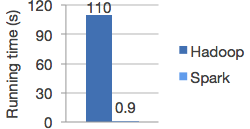
Spark vs Hadoop

Spark is 100X times faster then Hadoop.
The speed can be attributed to the fact that Spark keeps the intermediate data cached in local JVM.  Hadoop on the other hand in the name of Fault Tolerance write the intermediate data on to the disk and disk is expensive.
                                                                                                               *Image from Spark


Spark doesnt replace anything in Hadoop Ecosystem rather it offers a readable, testable way to write programs freeing us from the painful Map Reduce jobs. MR model is unsuitable for Iterative algorithms. MR jobs are pain to program too. Although there are tools to reduce our efforts in writing MR jobs like Hive, Cascading etc but internally they call MR jobs thus not improving the performance.

Spark programming model
The main abstraction for computation in Spark is Resilient(Can start automatically) Distributed Datasets.

What is RDD ? 
RDD(Spark Paper) :
RDD's are fault-tolerant, parallel data structures that let users explicitly persist intermediate results in memory, control their partitioning to optimize data placement, and manipulate them using a rich set of operators.


Spark transformations applies same data operation to many data items. This results in better Fault tolerance as only the lineage of transformation is logged rather then the actual data. Also if some of RDD's are lost it has enough information to how it is derived from other  RDD's.
RDD can be created through Transformations(map,filter,join). Spark creates Direct Acyclic Graph of these transformation . Once the RDD's are defined through transformations , actions can be applied on them.
Actions are application that returns a value(count,collect and save). In Spark RDD's can be stored in disk by calling persist.
Since it is just an RDD it can be queried via SQL Interface, ML algos etc.

In short
User Program => 
Create Spark Context
sc = new SparkContest
Create Distributed Datasets called RDD's 
Perform Operations.

Inside spark context act as client and master per application.

Block tracker => What is in memory what is on Disk ?
Shuffle => Shuffle operation like Groupby

Scheduler talk through cluster manager talks to a worker.
Contains Block Manager for Block Mgmt.
Recieves task that run in thread pools.
Task can talk to HDFS.

Tuesday, 23 September 2014

Hadoop a little deeper


Map Reduce :  Follows Master -  Slave Model 
Master :
NameNode
JobTracker 

Slave :
DataNode
Task Tracker


Dynamo/ Casandra => Peer to Peer

Client is neither master nor Slave.
=> submit map reduce task
=> describe how data to be processed.
=> retrieve data.

Hadoop Components  :

 
NameNode : 
=> Files are not stored in NameNode , it just contains filesystem meta data which points files to blocks 
=> Metadata also contains information such as DiskSpace, last access to NN, permissions . 
=> Name Node is rack aware. To what Rack data node is on.  
=> NameNode coordinates access to data node.


Data Node:
=> Manages Data 
=> Sends Heartbeat message to NN to say they are alive.
=> Comunicates with one another to replicate data, move and copy data around
=> Stores data as blocks.  

JobTracker: 
=> Manages job and resources in Hadoop. 
=> Client application submit MR request to Job Tracker
=> Schedule Client jobs and allocates task to Task Tracker.

 
Task Tracker: 
=> Slaves deployed at each machine. 
=> They follow instruction of Job Tracker and runs Map Reduce task
=> Handles movement of data between map and reduce phase.


Secondry NameNode:  
=> Name is a misnomer. 
=> It does all housekeeping task in HDFS. 
=> Namenode store all filesystem metadata in RAM. It doesnt have any capability to persist data to disk. 2ndNN sends message to NN every hour pull all the data from NameNode and merges into a file called Checkpoint.


 *Image taken from http://www.gigacom.com


Hadoop 1.**   => Hadoop 2.**:

1. Horizontal Scaling
2. Single Point of Failure for Name Node
3. Impossible to run Non Map Reduce tools because of tight coupling of JobTracker + MR
4. Does not support Multitanency
5. Job Tracker overburdened bcz of too much work.


1. Horizontal Scaling

NameNode all metadata stored in RAM of NameNode
RAM size is limited you cannot take it beyond certain point. 
Bottleneck after 4000 Nodes.

2. Single Point of Failure
No backup node if Namenode fails

3. Impossible to run Non Map Reduce tools because of tight coupling of JobTracker + MR
Only Map Reduce processing can be achieved
Realtime analytics , MPI difficult, No Graph processing
You cannot do in HDFS you have to move data out of HDFS. 
Only Batch processing in 1.** 


4. Multitanency :
Only 1 type of job at a time even if you run it from different application not possible.


Hadoop Component 2.** extra
1. Resource Manager
2. Namenode High Availability
3. YARN: Yet another resource Negotiator.


Instead of having single Name node multiple name nodes are there. Independent to each other. Adhere to specific namespace.

Both JobTracker and task Tracker removed in Hadoop 2 .
Job Tracker task : Resource Management & Job Scheduling was split into two components.below 

New Components in Hadoop2.


1. Resource Manager :  
=> Scheduler that allocates resources in the cluster to various running application. 
=> Schedules task based on Application Container. 

2. Application Manager
=> Launches task in containers. 
=> Starting Application Master container on failure.

3. Node Manager:  
=> Runs on each node
=> Follows orders of Resource Manager. 
=> Responsible for maintaining container 
=> manages resources of a single node.


Other Feautures:

Name Node HA:
Automatic failover and recovery for NameNode master survice.
2 Namenodes :   Active and Passive when one fails other take control.

Snapshots:
Point intime recovery for backup.

Federation :
Generic block storage layer.

Saturday, 3 May 2014

Simplifying the map reduce framework

Google MapReduce

What is Map Reduce ?
 Map Reduce is a model to process large amount of data in Parallel.Let user handle Computation aspects and hides the messy details of parallelization, fault tolerance,data distribution and load balancing .

Whats the programming model for MapReduce ?
Input <Key,Value> pair  -> Output <key,Value>pairs.
Map and Reduce two functions.
Map takes input pair,producing intermediate key value pair.
Group all intermediate values assiciated with same intermediate key k and pass it to Reduce funtion.

Reduce function :  Merge these intermediate values producing a smaller set if values.
 

What are some of the examples? 
Word Count. Count all occurrence of words in a set of documents. 
Map funciton -> each word plus an associated count..
Reduce function -> sum together all counts emitted.

Distributed Grep :  Map : Emits line if matches specific pattern, 
reduce identity function ,copies data to output.   

Count of URL access frequency : 
Map : Logs of web page request outputs <URL,1>
Reduce : Adds all values for the same URL <URL,total count>

Reverse Web Link Graph : 
Map: outout<target,source>
Link pairs target url found on source.  
Reduce : sums all source URL associated with a target.

Distributed Sort
Machine Learning.

What are the steps invloved in Map Reduce ?
1.Split the input file into M pieces of 16 MB or 64 MB.Starts many copies on cluster machine.
2.Follows master and slave model.1 Master many slaves or workers. Master  asssigns idle workers a task from M map and R reduce tasks.
3.Map worker reads input split . generate key value pair form it,pass it to Map function.
4.Map produces intermediate <Key,Value>pair which are buffered in memory.
5. Buffered pairs written to local disk periodically.Local disk partioned into R regions by partitioning function.
6.Location of these passed passed bak to master who forward these to workers.
7.Worker when recieves notification of a location, uses RPC to read buffered data from buffered Disk. Sort the data by intermediate key for grouping.
8.Reduce worker , iterates over sorted intermediate key and for each unique key it passes the <key,Value> pair to reduce function.
9.Writes the output to files.
 
Master :
Stores state(Idle,in-progress or compleated) and identity of worker machine.


Why Combiner Function ?
A mapper function(WOrdCount) produces output in the form <'the',1> with word and its count.  This output is then sent over the network to a single reduce task and clubbed together to produce as many output files as the number of reducer function.
Combiner function does parital merging of data ,before it is sent over the network. Combiner function runs on each machine that has Mapper funciton.
Combiner function significantly speeds up the MapReduce operation by minimizing the number of <k,v> pair that will be sent over the network therby improving the bandwidth. Combiner code is similar to Reducer. 

Tuesday, 19 November 2013

Install Hadoop steps - Both single and Multiple machine...


Hadoop Installation for Windows..


Steps :
A. Prequisites

1. Install Putty. http://www.chiark.greenend.org.uk/~sgtatham/putty/
2.Get Ec2 Instance.
3.Go to EC2 instance and check the public DNS name.
4.Get Private key(.pem)

B.Convert .pem to .ppk

1. Start PuTTYgen.
2.Under Type of key to generate, select SSH-2 RSA.


3.Click Load. By default, PuTTYgen displays only files with the extension .ppk. To locate your .pem file, select the option to display files of all types. Generate PPK from Pem file you obtained from ec2.


 4a. Click Load if already saved Config

 
4b.Click SSh to browse PPK key.


5.Install JAVA (Hadoop is written in Java)
sudo apt-get install openjdk-7-jdk

6.Install OpenSSH for SSH
sudo apt-get install openssh-server

7.Create Hadoop user. So that you can run your program
sudo addgroup hadoop // creating Hadoop Group
sudo adduser --ingroup hadoop hduser // adding user to the group
sudo adduser hduser sudo

8. Generating Keys
$ ssh-keygen -t rsa -P ''
...
Your identification has been saved in /home/hduser/.ssh/id_rsa.

...
$ cat ~/.ssh/id_rsa.pub >> ~/.ssh/authorized_keys
$ ssh localhost

9.Disabling IPV6

net.ipv6.conf.all.disable_ipv6 = 1
net.ipv6.conf.default.disable_ipv6 = 1
net.ipv6.conf.lo.disable_ipv6 = 1

9. Installing Hadoop

Cd /usr/local/ 

sudo wget http://archive.apache.org/dist/hadoop/core/hadoop-0.20.203.0/hadoop-0.20.203.0rc1.tar.gz

//Unzip the tar

sudo tar xzf hadoop-0.20.203.0rc1.tar.gz

//move 
sudo mv hadoop-0.20.203.0rc1 hadoop

//set ownership   
sudo chown -R hduser:hadoop hadoop


10.Update .bashrc with the proper path

cd ~
add java_home
    
export JAVA_HOME=/usr/lib/jvm/java-7-openjdk-amd64
export HADOOP_HOME=/usr/local/hadoop
11.cd /usr/local/hadoop/etc/hadoop
vi hadoop-env.sh
JAVA_HOME=/usr/lib/jvm/java-7-openjdk-amd64
12.Create tmp for hdfs 

$ sudo mkdir -p /app/hadoop/tmp
$ sudo chown hduser:hadoop /app/hadoop/tmp
# ...and if you want to tighten up security, chmod from 755 to 750...
$ sudo chmod 750 /app/hadoop/tmp

13. Configure Hadoop - edi core-site.xml
cd /usr/local/hadoop/etc/hadoop

or 
cd vi /usr/local/hadoop/cong/core-site.xml
vi core-site.xml

For version <2 
<property>
  <name>hadoop.tmp.dir</name>
  <value>/app/hadoop/tmp</value>
  <description>A base for other temporary directories.</description>
</property>

<property>
  <name>fs.default.name</name>
  <value>hdfs://localhost:54310</value>
  <description>The name of the default file system.  A URI whose
  scheme and authority determine the FileSystem implementation.  The
  uri's scheme determines the config property (fs.SCHEME.impl) naming
  the FileSystem implementation class.  The uri's authority is used to
  determine the host, port, etc. for a filesystem.</description>
</property> 

For version >2
 Bcz of Yarn

<property>
   <name>fs.default.name</name>
   <value>hdfs://localhost:9000</value>
</property
13. update for version < 2
mapred-site.xml

<property>
  <name>mapred.job.tracker</name>
  <value>localhost:54311</value>
  <description>The host and port that the MapReduce job tracker runs
  at.  If "local", then jobs are run in-process as a single map
  and reduce task.
  </description>
</property> 

for version >2
<property>
   <name>yarn.nodemanager.aux-services</name>
   <value>mapreduce_shuffle</value>
</property>
<property>
   <name>yarn.nodemanager.aux-services.mapreduce.shuffle.class</name>
   <value>org.apache.hadoop.mapred.ShuffleHandler</value>
</property>

14. Set Replication Factor 
file conf/hdfs-site.xml
<property>
  <name>dfs.replication</name>
  <value>1</value>
  <description>Default block replication.
  The actual number of replications can be specified when the file is created.
  The default is used if replication is not specified in create time.
  </description>
</property>


15. Format nAmenode
hadoop namenode -format

16.Start-all.sh
depecated for v >2 but will work Invokes both dfs and mapred-site.xml
 ----- Till here single node ---

For multinode.. 
17.Everything is working fine..

18.Create few more instances of EC2 clusters in same way
Update vi etc/hosts from home directory
add IP address and name which you will use
ex...
10.23.45.67 master10.11.11.11 slave1
10.12.12.12 slave2

19.Copy pub key of master to the list of authorized key of client 
vi /home/hduser/.ssh/id_rsa.pub
add the content to 
vi /home/hduser/.ssh/id_rsa/authorized_keys of slave1

20.you can ssh to both master and slave

21.once you type ssh slave you will be taken to slave machine 
exit it from maser

22.On master edit conf/master 
master

23. On master edit conf/slaves  
add the following

master
slave1 
slave2

23. Update core-site.xml ALL MACHINE
 <property>
  <name>fs.default.name</name>
  <value>hdfs://IPADDRESS OF MASTER HERE:54310</value>
  <description>The name of the default file system.  A URI whose
  scheme and authority determine the FileSystem implementation.  The
  uri's scheme determines the config property (fs.SCHEME.impl) naming
  the FileSystem implementation class.  The uri's authority is used to
  determine the host, port, etc. for a filesystem.</description>
</property>

23. update mapred-site.xml for all machine
<property>
  <name>mapred.job.tracker</name>
  <value>masterIP ADDRESS:54311</value>
  <description>The host and port that the MapReduce job tracker runs
  at.  If "local", then jobs are run in-process as a single map
  and reduce task.
  </description>
</property> 

24.set  replication update hdfs-site.xml
<property>
  <name>dfs.replication</name>
  <value>2</value>
  <description>Default block replication.
  The actual number of replications can be specified when the file is created.
  The default is used if replication is not specified in create time.
  </description>
</property> 

25.format name node 

26.start-all.sh


This is what i got from reading from various blogs.. I have installed Hadoop many times 
and feel like I should write the steps  
Its the mix of both single and multinode cluster

I used http://www.michael-noll.com/tutorials/running-hadoop-on-ubuntu-linux-multi-node-cluster/#java-io-ioexception-incompatible-namespaceids
but modified in many ways..