Showing posts with label Hadoop. Show all posts

Wednesday, 7 September 2016

Setting up spark on a multicluster Machine

  1. Spark work on a master - slave model. 
  2. Master Machine and Slave Machines required. You can have master and slave on same machine too. 
  3. For testing purpose you can generate the cluster on same machine , approach similar 
  4. In each machine check if Java is installed

    JAVA install/update 
  5. If you are using a new machine, ec2 it wont come preinstalled with Java.  
  6. You can set up Java following below steps
  7.  First update package index :
    1. sudo apt-get update
    2. check version java -version 
    3. If Java not found →  Install JRE 
      1. sudo apt-get install default-jre
      2. sudo apt-get install default-jdk
  8. check Java-version 
  9. This might install Java 1.6 
  10. sudo apt-get install openjdk-7-jre
  11. sudo apt-get isntall openjdk-7-jdk
  12. Issue : Java still points to version 6. 
  13. Follow below steps to update 
    1. update java-alternatives -l
    2. sudo update-java-alternatives s java1.7.0-openjdk-amd64 (your path to the newer) 

    Instance Setup 
  14. Login to Dev or EC2 instances 
  15. If Running on Ec2 Do the following:
    1. Create an account, generate private  and public key pairs download the keys to one of the machine. You can get those steps online on how to generate key pairs. 
    2. Create two system variables for AWS_ACCESS_KEY and AWS_SECRET_KEY
    3. Go to spark directory on your local machine  and run the ec2 script from ./sbin/ec2 file.
    4. ./spark-ec2 --key-pair=awskey --identity-file=awskey.pem --region=us-west-1 --zone=us-west-1a launch my-spark-cluster
    5. This will create two Large instances cluster. 

    SetUp Spark 
  16. Download Spark → Select Hadoop latest  Version and follow the link  
  17. For dev box : you can download using : 
    1. wget spark link 
    2. unzip using tar -xzf folder for spark
  18. Do this in all machines you want to run spark on .
  19. Set up env variable SPARK_HOME to point folder just before the bin directory, in normal case it will be the unzipped folder
  20. Save it using source ./bashrc
  21. Decide on which machine you want your master and slave


    Master Machine 
  22. Login to Master Machine, follow below steps
  23. edit hosts file for master
    1. vi /etc/hosts
    2. Provide the link between IP and name 
    3. IP Machine1
      IP Machine 2 
       
  24. Next few steps are changes in spark code
    1. slaves template is located in the conf directory.
    2. there is a file called slave template, same file can be used or a new file called you can create from that buy copying the content to slaves
    3. Paste the names of all slaves in this file 
      1. slave 1
      2. slave 2
      3. slave 3
  25. Go to Spark Sbin Directory 
    1. cd ./sbin/
    2. run ./sbin/start-master.sh
  26. This will start the master on port 8080, access it via IP address or Machine Name
  27. For current case go to any web browser and type :  http://machinename:8080
  28. This was required because you need to get the spark master address. When you go to the link it will show the url at the top spark://machinename:7077 
  29. Copy it 
  30. Go to /conf/spark-defaults.conf.template
  31. Add the masters url in the file 
  32. spark.master spark://machinename:7077 (it can also start with IP or a bigger name like machinename:7077
  33. Go to /sbin/spark-env.sh
  34. Add the following lines to it 
  35. export SPARK_WORKER_MEMORY=1g  You can specify how much memory you wanna give to worker 
    export SPARK_WORKER_INSTANCES=2 → No of workers
    export SPARK_MASTER_IP=spark-2 → Name of Spark master
    Slave
  36.  Go to slave Machine /sbin/start-slave.sh
  37. Run JPS in both slaves and master

Note : You need a password less access between master and  copy masters pub key defined in : id_rsa.pub move to authorized_key in slave and save. 

Very Useful links
http://blog.cloudera.com/blog/2015/03/how-to-tune-your-apache-spark-jobs-part-1/
http://blog.cloudera.com/blog/2015/05/working-with-apache-spark-or-how-i-learned-to-stop-worrying-and-love-the-shuffle/
https://www.codementor.io/spark/tutorial/spark-python-rdd-basics


Thursday, 12 March 2015

Spark Streaming

In my previous post I mentioned about Spark Stack. In this post I am to give a brief overview of the component Spark Streaming.
Spark Streaming is an extension to Apache Spark that allows processing of live streams of data.
Data in Spark can be ingested from Kafka, Flume, Twitter or TCP sockets. 

Live Data is broken into chunks/batches for predefined interval of time. Each chunk of data represents an RDD and is processed using RDD operations. Once the operations are performed the results are returned in chunks.
DStream is a basic abstraction in Spark Streaming. They represent a chunk of data and as such implemented as an RDD. Dstreams are created from streaming input sources like Kafka, Twitter etc or by applying transformation operations on existing DStream.
Spark Streaming

The incoming data as mentioned above is processed in predifined interval. All the data for any interval is stored across the cluster for that interval. This results in creation of a dataset. Once the time interval is completed dataset is processed using various operations. The operations could be map-reduce or join. 
Streaming Context is the main entry point of spark application.
val sc = new StreamingContext(sparkContext, seconds(1))
Using sc, Dstreams can be created that represents streaming data from input sources ex. TCP/Twitter. 
TCP
val sData = ssc.socketTextStream("1.2.3.4", 1000)
Here First parameter represents Ip address and second port number. sData represents Dstream of data that will be received from server.
Twitter
val tData = TwitterUtil.createStream(ssc, oauth)
Where oauth denotes the Oauth. Twitter uses Ouath for authorization requests.

Once this is done transformations are applied on the created RDD. One such transormation is flatMap. 
val hashTag = tData.flatMap(status => getTag(status))
val words = sData.flatMap(_.split(" "))
flatMap is an operation that is similar to map but each input is mapped to 0 or more output items resulting in a sequence of data as output. 


Thursday, 25 December 2014

Apache Spark a brief overview

Apache Spark a PHD resarch project at UCBerkley came into limelight when it broke the record of sorting petabyte of data recently.
Various Sorting Records.
Databrick


What is Spark ?
Apache Spark™ is a fast cluster computing framework and general engine for large-scale data processing.
Spark Goals:
Generality : Diverse workloads, operators, jobsizes.
Latency:Low Latency
Fault Tolerance


Spark supports Hadoop, Amazon S3, Cassandra, cluster management tools like YARN and Mesos. Spark does more In memory data processing as compared to DiskBased processing as in Hadoop.

Spark stack comes bundled with tools like Spark SQL, MLlib, Spark Streaming and GraphX.


  1. SparkSQL: Unified access to structured data , provides compatibility with Apace Hive and Standard Connectivity to tools like JDBC and ODBC.
  2. Spark Streaming:  For Scalable fault tolerant Streaming applications and spark can run in both batch and interactive mode.
  3. MLlib:Scalable Machine Learning library.
  4. GraphX:Large Scale Graph Processing Framework.
Learn More about Spark


Spark vs Hadoop

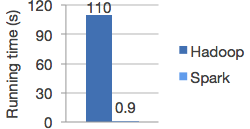
Spark is 100X times faster then Hadoop.
The speed can be attributed to the fact that Spark keeps the intermediate data cached in local JVM.  Hadoop on the other hand in the name of Fault Tolerance write the intermediate data on to the disk and disk is expensive.
                                                                                                               *Image from Spark


Spark doesnt replace anything in Hadoop Ecosystem rather it offers a readable, testable way to write programs freeing us from the painful Map Reduce jobs. MR model is unsuitable for Iterative algorithms. MR jobs are pain to program too. Although there are tools to reduce our efforts in writing MR jobs like Hive, Cascading etc but internally they call MR jobs thus not improving the performance.

Spark programming model
The main abstraction for computation in Spark is Resilient(Can start automatically) Distributed Datasets.

What is RDD ? 
RDD(Spark Paper) :
RDD's are fault-tolerant, parallel data structures that let users explicitly persist intermediate results in memory, control their partitioning to optimize data placement, and manipulate them using a rich set of operators.


Spark transformations applies same data operation to many data items. This results in better Fault tolerance as only the lineage of transformation is logged rather then the actual data. Also if some of RDD's are lost it has enough information to how it is derived from other  RDD's.
RDD can be created through Transformations(map,filter,join). Spark creates Direct Acyclic Graph of these transformation . Once the RDD's are defined through transformations , actions can be applied on them.
Actions are application that returns a value(count,collect and save). In Spark RDD's can be stored in disk by calling persist.
Since it is just an RDD it can be queried via SQL Interface, ML algos etc.

In short
User Program => 
Create Spark Context
sc = new SparkContest
Create Distributed Datasets called RDD's 
Perform Operations.

Inside spark context act as client and master per application.

Block tracker => What is in memory what is on Disk ?
Shuffle => Shuffle operation like Groupby

Scheduler talk through cluster manager talks to a worker.
Contains Block Manager for Block Mgmt.
Recieves task that run in thread pools.
Task can talk to HDFS.

Tuesday, 23 September 2014

Hadoop a little deeper


Map Reduce :  Follows Master -  Slave Model 
Master :
NameNode
JobTracker 

Slave :
DataNode
Task Tracker


Dynamo/ Casandra => Peer to Peer

Client is neither master nor Slave.
=> submit map reduce task
=> describe how data to be processed.
=> retrieve data.

Hadoop Components  :

 
NameNode : 
=> Files are not stored in NameNode , it just contains filesystem meta data which points files to blocks 
=> Metadata also contains information such as DiskSpace, last access to NN, permissions . 
=> Name Node is rack aware. To what Rack data node is on.  
=> NameNode coordinates access to data node.


Data Node:
=> Manages Data 
=> Sends Heartbeat message to NN to say they are alive.
=> Comunicates with one another to replicate data, move and copy data around
=> Stores data as blocks.  

JobTracker: 
=> Manages job and resources in Hadoop. 
=> Client application submit MR request to Job Tracker
=> Schedule Client jobs and allocates task to Task Tracker.

 
Task Tracker: 
=> Slaves deployed at each machine. 
=> They follow instruction of Job Tracker and runs Map Reduce task
=> Handles movement of data between map and reduce phase.


Secondry NameNode:  
=> Name is a misnomer. 
=> It does all housekeeping task in HDFS. 
=> Namenode store all filesystem metadata in RAM. It doesnt have any capability to persist data to disk. 2ndNN sends message to NN every hour pull all the data from NameNode and merges into a file called Checkpoint.


 *Image taken from http://www.gigacom.com


Hadoop 1.**   => Hadoop 2.**:

1. Horizontal Scaling
2. Single Point of Failure for Name Node
3. Impossible to run Non Map Reduce tools because of tight coupling of JobTracker + MR
4. Does not support Multitanency
5. Job Tracker overburdened bcz of too much work.


1. Horizontal Scaling

NameNode all metadata stored in RAM of NameNode
RAM size is limited you cannot take it beyond certain point. 
Bottleneck after 4000 Nodes.

2. Single Point of Failure
No backup node if Namenode fails

3. Impossible to run Non Map Reduce tools because of tight coupling of JobTracker + MR
Only Map Reduce processing can be achieved
Realtime analytics , MPI difficult, No Graph processing
You cannot do in HDFS you have to move data out of HDFS. 
Only Batch processing in 1.** 


4. Multitanency :
Only 1 type of job at a time even if you run it from different application not possible.


Hadoop Component 2.** extra
1. Resource Manager
2. Namenode High Availability
3. YARN: Yet another resource Negotiator.


Instead of having single Name node multiple name nodes are there. Independent to each other. Adhere to specific namespace.

Both JobTracker and task Tracker removed in Hadoop 2 .
Job Tracker task : Resource Management & Job Scheduling was split into two components.below 

New Components in Hadoop2.


1. Resource Manager :  
=> Scheduler that allocates resources in the cluster to various running application. 
=> Schedules task based on Application Container. 

2. Application Manager
=> Launches task in containers. 
=> Starting Application Master container on failure.

3. Node Manager:  
=> Runs on each node
=> Follows orders of Resource Manager. 
=> Responsible for maintaining container 
=> manages resources of a single node.


Other Feautures:

Name Node HA:
Automatic failover and recovery for NameNode master survice.
2 Namenodes :   Active and Passive when one fails other take control.

Snapshots:
Point intime recovery for backup.

Federation :
Generic block storage layer.

Wednesday, 4 June 2014

Consensus Protocols : Overview

Consensus Problem :  Mutually Agreeing on a particular Value


In this I have Considered both Txn and Normal operations consensus . 


Synchronous System :
Bounded Message Delay
No timeouts

Asynchronous : 
Message delay finite but unbounded
Consensus not always possible

Correctness of Consensus Protocol :
Agreement : All Nodes agree on a value
Validity : Value proposed is Valid ie.. It is proposed by one of participant node.

Non Triviality* : There exist a accessible configuration in which the decision is to commit
Integrity*: Each (RM decides atmost once)

Termination: All nodes Eventually Terminates
*For Txn commit

Agreement can be between majority of nodes.
Database Commit protocol that always says Abbort is not Valid
Termination of messages exchanged so that the protocol is useful.

2PC : 2 Phase Commit: 

1)Coordinator : Contact all nodes, suggest value , gather response(Form of Vote)
2)If everyone agrees contact for committing else contact for abort.


IMP: Consensus here is not on value proposed but weather to accept or reject the value nor the value.
Not on what value should but rather weather to accept or reject value.

Real Time Example
Transfer money from one account to another
Move file between servers

TO check weather commit happened see log.

Phase 1: Coordinator Request
Coordinator request (REQUEST Message to all nodes)
Eg : Delete file from directory

Nodes receive requests execute tranxn locally
Write to local log Request ,Result,VOTE_COMMIT or VOTE_ABBORT
Send VOTE_COMMIT to cordinator

Coordinator receive vote VOTE_ABORT
Write GLOBAL_ABORT/COMMIT to Global Log and sends GLOBAL_ABORT/COMMIT to participant nodes.
No of messages : 3n where n is number of nodes. ( N - Value Propose, N-Vote , N -Commit/Abbort)

Failures: 
1)Fail Stop : Nodes Crash and Never recover
2)Fail Recover: Crash and recover after sometime
3)Byzantine: Divert from protocol specification .
Example an army of Soldiers, coordinator is a general . Agree on one point or fail. Some soldiers traitor :
All loyal traitors should agree
Small Number of traitors should not be able to trick loyal soldiers.

Case 1: Before messages exchanged server crashes. (No worries) bcz protocol never started.
Case 2: Some proposal messages sent but not all.

Some nodes received proposal starting 2PC ,and some havent recieved any proposal. If coordinator do not recover in time , nodes that have sent proposal keeps on waiting for things that never finished.
Protocol Blocked.

Have another node to become co-ordinator. When timeout occurs that node can finish task that co-ordinator started.

Contacts all nodes to find out to whom the nodes voted.
So all nodes has to keep their descision on persistent storage.

If one another participating node fails before recovery node has committed, cant be recovered.
Recovery node cant distinguish between all nodes having voted to commit or abort.
Coordinator is participant too and then it fails.
 
Cordinator logs the result in persistent storage.
Advantage : Low  message Complexity.

Link: 
http://the-paper-trail.org/blog/consensus-protocols-two-phase-commit/


2PC transaction Commit: 

TM has following states : init,Preparing, Commit and aborted.
Let Trxn cordinator TMi

Phase 1: Obtaining a decision 
Initiate TM
TM ask all participant to prepare to commit transaction
TM adds record<Prepare>to its recovery long and saves it in stable storage
Send Prepare to all sites at which t is executed.

After receiving all messgae RM(Resource Manager ) can decide if it can commit on transection.
If transaction can be commited adds the record <ready> to log.
Flush all record to storage
Send Ready msg to TM
Else add <no> to log and sends a msg abort to TM

Phase 2: Aborting a decision
T commited if only TM receives ready msg else abort
TM add decision <commit> or <abort> to log 
TM sends msg to each particpant informing of descison.
RM does the same on recieving msg (Stores in log)

 
2PC suffers from Single Point of Failure.


Failure 2PC TXN RM:
RM participating in TXn fails and then recovers and then examins log:
if log says <commit> no action
log says<abort>no action
log says <ready> RM must consult TM for the fate. IF commite, redo log and write commit
else write abort.

If site contains no record => RM failed before responding to prepare. TM abort txn and RM should undo T

Failure TXN TM:
If TM fails before completion RM decides fate
IF one of RM contains commit then T is commited else aborted.
If RM of any site doesnt contain ready, no decision can be taken <abort>
IF RM has ready then sited must wait for TM to recover. Blocking problem

TOTAL MSG: 1 to initiate TM, 2n in phase 1 n in phase 2 total : 3n+1 
4 msg delay
n+1 writes to stable storage n by RM and 1 by TM


_____________________________________________________

3 PC
Problem of 2 PC removed by an extra Phase.
Idea break 2PC second phase into 2 phases. 
1st Prepare to commit phase. 
Co-ordinated sends to all if it has received yes from all .Nodes store them and then sends msg to cordinator that prepare to commit was received.
Purpose is to communicate result of vote to every node so that the state can be recovered. 

Last phase : If coordinator receives result of prepare of commit from all replica it commits, if delivery is not confirmed and our system can handle f failure co-ordinator can go ahead once it recieves f+1 msg.
If co-ordinator crash at any time , recovery node can take over transaction and query state from any remaining node.
If anyother node  crashes , it can read form other nodes.
Problem :
Network was divided into 2 partitions and both had different results.
Works for fail-stop not for fail-recover.


Cordinator fails before it has received prepared to commit replies from nodes,new co-ordinator takes over.Recover Co-or will interrogates nodes to know of the decision and completes them. At same time main co-or recovers and relies it has not received replies from all times them out,sending abort to all.messages gets interleaved with commit msg of recovery co-or resulting in inconsistent state.
_____________________________________________________________________

PAXOS 
One Node act as proposer and is responsible for initiating protocol.
Acceptors other nodes.
Acceptors accept or reject .
Once majority have  accepted protocol can terminate.
Proposer sends propose req to acceptor, acceptor responds once acceptor agrees, proposer sends commit request to acceptor.

Paxos adds 2 main improvements to 2PC.
1) Order to determine what proposal can be accepted.
2) Consider accepted if majority has done that.

Every proposer tagged with unique sequence number . Number required to decide on ordering of which proposer came first,
Once proposal arrives acceptors sees whats the highest number of proposal they have received.If new proposer number > previous acceptor reply saying it wont accept any proposal less then the recieved seq num.
All proposers unique seq number.
if two proposers are agreed on by majority atleast one will be common to both.
When new proposal is made new majority will guarantee acceptor that saw both previous proposals or two acceptors that saw one each.

Once it receives message from majority, proposer can go ahead and ask to commit to a value.

Case if 2 proposers propose first proposal accepted by just majority and if before reply of prepare to commit the acceptor fails . no majority. 
Now new proposer propose and its accepted by majority, it commits
Failed acceptor wakes up and sends final accept msg to orignal proposal first proposer commits too . Correctness voilated.  
Solution both propose same value. If any proposer receives higher value then it accepts it.


Failure :
If f failure allowed, no of acceptor 2f+1
If proposer fail, another can take over. 
If orignal recovers and see no > his own . 
It can agree on that.
Issue if both proposal send proposal one more then previous in every request, will never come to consensus.

Acceptor need to record highest proposal in stable storage.
if that storage crash cannot take part(Byzantine)

Efficiency:
1st phase : f+1 msg and recieve f+1 replies
repeat till 4 phases : 4f+4 msg
Delay till protocol completed 4 msgs.
It can be seen that 2F+1 needed for consensus with despite failure of f.
 

Paxos Commit Protocol:
Txn initiator calls TM
TM sends prepare to RM 
RM sends Phase 2a to acceptor 
acceptor sends phase 2b to TM
TM sends commit to RM
TOTAL MSG : 2F *(n+1) + 3n + 1 msgs
5 msg delays
n+2F+1 writes to stable storage.

Analysis:
1 msg initiator to TM
N prepare msg from TM to RM
N commit from TM to RM
N(2F+1) phase 2a commit msg from RM to acceptor as each RM sends to acceptor 

2F+1 phase 2b msgs.

total 2f(n+1)  + 3n+2

Transection initiated by one of RM so 1 prepare msg can be avoided bwn RM and TM
if TM in same node as acceptor phase 2b msg can be avoided. 

If each acceptor same node as RM and TM also on RM
F+1 of phase 2a and f+1 of phase 2b can be avoided.

Links:
PaperTrail
Paxos Commit 
Paxos Simple 


Saturday, 3 May 2014

Simplifying the map reduce framework

Google MapReduce

What is Map Reduce ?
 Map Reduce is a model to process large amount of data in Parallel.Let user handle Computation aspects and hides the messy details of parallelization, fault tolerance,data distribution and load balancing .

Whats the programming model for MapReduce ?
Input <Key,Value> pair  -> Output <key,Value>pairs.
Map and Reduce two functions.
Map takes input pair,producing intermediate key value pair.
Group all intermediate values assiciated with same intermediate key k and pass it to Reduce funtion.

Reduce function :  Merge these intermediate values producing a smaller set if values.
 

What are some of the examples? 
Word Count. Count all occurrence of words in a set of documents. 
Map funciton -> each word plus an associated count..
Reduce function -> sum together all counts emitted.

Distributed Grep :  Map : Emits line if matches specific pattern, 
reduce identity function ,copies data to output.   

Count of URL access frequency : 
Map : Logs of web page request outputs <URL,1>
Reduce : Adds all values for the same URL <URL,total count>

Reverse Web Link Graph : 
Map: outout<target,source>
Link pairs target url found on source.  
Reduce : sums all source URL associated with a target.

Distributed Sort
Machine Learning.

What are the steps invloved in Map Reduce ?
1.Split the input file into M pieces of 16 MB or 64 MB.Starts many copies on cluster machine.
2.Follows master and slave model.1 Master many slaves or workers. Master  asssigns idle workers a task from M map and R reduce tasks.
3.Map worker reads input split . generate key value pair form it,pass it to Map function.
4.Map produces intermediate <Key,Value>pair which are buffered in memory.
5. Buffered pairs written to local disk periodically.Local disk partioned into R regions by partitioning function.
6.Location of these passed passed bak to master who forward these to workers.
7.Worker when recieves notification of a location, uses RPC to read buffered data from buffered Disk. Sort the data by intermediate key for grouping.
8.Reduce worker , iterates over sorted intermediate key and for each unique key it passes the <key,Value> pair to reduce function.
9.Writes the output to files.
 
Master :
Stores state(Idle,in-progress or compleated) and identity of worker machine.


Why Combiner Function ?
A mapper function(WOrdCount) produces output in the form <'the',1> with word and its count.  This output is then sent over the network to a single reduce task and clubbed together to produce as many output files as the number of reducer function.
Combiner function does parital merging of data ,before it is sent over the network. Combiner function runs on each machine that has Mapper funciton.
Combiner function significantly speeds up the MapReduce operation by minimizing the number of <k,v> pair that will be sent over the network therby improving the bandwidth. Combiner code is similar to Reducer. 

Wednesday, 26 March 2014

Python and NLP

I recently worked on a project titled "Recommending Similar defects on Apache Hadoop" .Its a recommendation system that predicts similar defects and then predicts the effort estimate for each defect.
Steps:
1) Extract XML/Excel data from Apache Hadoop Issue Tracker.
https://issues.apache.org/jira/browse/HADOOP
2)Convert the extracted data into CSV for persistent storage.
3)Extract required Column


Python COde :

import csv
import re

def col_selector(table, column_key):
    return [row[column_key] for row in table]

with open("Data/next.csv","r") as csvfile:
    reader = csv.DictReader(csvfile, delimiter=",")
    table = [row for row in reader]
    foo_col = col_selector(table, "Summary")
    bar_col = col_selector(table, "Description")

The above example extract two columns from Apache Hadoop Issue Tracker CSV file.  Your program must include python library called csv.py
http://docs.python.org/2/library/csv.html

4)From these Column we will generate a set of words specific to Hadoop.
We will apply various NLP to generate various words from the summary and description.

5)There are 5 Steps in Natural Language Processing 
1. Tokenizing
2. Stemming
3. Stop Word Removal
4. Vector Space Representation
5. Similarity Measures

Step 1 : Tokenizing :
 The tokenization process involves breaking a stream of characters of text up into words or phrases, symbols or other meaningful elements called tokens. Before indexing, we Fillter out all common English stopwords.I obtained a list of around 800 stopwords online. 
K. Bounge. Stop Word List.
https://sites.google.com/site/kevinbouge/stopwords-lists
The list contained articles, pronouns, verbs etc. I filtered out all those words from our extracted text. After reviewing the list, we felt stopwords list for a Hadoop Database has to be built separately, as numbers and sym-
bols are also to be filtered out. 


Step 2:
Stemming is used to try to identify a ground form for each word in the text. Some words that carry the same information can be used in different grammatical ways, depending on how the creator of the report wrote it down. This phase will remove a xes and other components from each token
that resulted from tokenization so that only the stem of each word remains. For stemming, we used a python library called PortorStemmer. We passed to it stream of extracted words. Words like caller, called, calling whose stem was call were Filtered and only 1 word, call, was kept in the nal list.I Filtered around 1200 words this way.


Step 3:
Stop Word Removal 
Synonyms removal and replace by 1 common word.I used wordnet NLTK to perform this.
Second Phase : Spell checking: List compared with list of misspelled words.

Step 4:
Vector Space representation.
After the first 3 steps I had around 5500 words. These words were used to identify tags.Each defect with tags was then represented into a Vector space model.Used general method used by scikit.

Step 4: Similarity Measure.
Calculated the cosine similarity between the two defect vectors.
 

Saturday, 1 March 2014

Keyword Analysis on Apache Hadoop Issue Tracker

In my recent project titled "Recommending similar defects and Effort Estimate for Apache Hadoop Issue Tracker"
I recently wrote python code to extract most used hadoop specific keywords in the issue tracker after removing irrelevant words and stop words from the list.
I am classifying them into various classes like HDFS Hadoop Error MINING DataNode etc Some of the words that is found on the list are posted.
Click for the word list


List has approximately 4700 words .
Duplicate words were removed from the list.
The list analyzed first 200 defects from Hadoop Commons and Hadoop HDFS.
Both Summary and Description of the defects were analyzed and were selected based on their need on the defect analysis.


The stop word list is prepared by combining various lists available online like FoxStoplist.txt  
stopwords-lists 
I believe that this list might be useful for someone working on Language Processing for Issue related words and Hadoop Specific words.  
Defect Example : HDFS : 6001  
Description : When hdfs is set up with HA enable, FileSystem.getUri returns hdfs:// Here dfs.nameservices is defined when HA is enabled.
In documentation: This is probably ok or even intended. But a caller may further process the URI, for example, call URI.getHost(). This will return the 'mycluster', which is not a valid host anywhere.
Summary : In HDFS HA setup, FileSystem.getUri returns hdfs://  


Keywords : #Hdfs #dfs.nameservices # FileSystem #getUri #Nameservices #host #URIL #HA #returns

Thursday, 2 January 2014

GPS : A Parallel Graph Processing Framework

As soon as google announced Pregel , Many open source started to flow in . Some were gone with the wind like Phoebus,HipG,GoldenOrb where as some stands tall because of there robust framework. One such Pregel implementation is GPS. A parallel Graph Processing Framework. I wont call it a Pregel Clone because of the added features it has.
In GPS the vertices of graphs are distributed across machines and message are exchanged between vertices to perform the computation. Each computation is devided into iterations called superstep where at each vertex vertex.compute function is applied.Unlike Pregel GPS brings with it some new features that makes the execution really fast .
1) One such feature of GPS is master.compute() function. Many algorithms like pagerank,shortest path can be implemented with vertex.compute() function but some algorithms like K-Means are combination of global and vertex computations . For those functions GPS has something called master.compute() function.With the present pregel implementation we had to consider one vertex as master and had to put the logic of global computation inside that function resulting in a sharp increase in execution time .In GPS pregels  API is extended by including master.compute() function. Subclass the master class and implement the master.compute() function. Master class has access to all global functions and also update the global object map.
2)Dynamic Repartitioning :  To reduce the number of messages exchanged during algorithm computation GPS reassigns vertex to different workers dynamically
3)LALP : large adjacency list partitioning (LALP) :  Adjacency list of high degree vertices are distributed across different workers rather then storing at single worker resulting in again lesser message exchange.

Sunday, 22 December 2013

GraphLab and GraphChi : Overview


GraphLab is an example of a Pregel-inspired system. It does not use the BSP model. Instead, it uses an asynchronous model suitable for computations with sparse data dependencies. GraphLab is written in C++ and was originally tailored for machine learning tasks. GraphLab provides an Update function which is analogous to the Map function in MapReduce. This function can read and update the sets of program state in a controlled fashion. It also provides an equivalent of the Reduce function the Sync
function which enables the simultaneous execution of reductions as well as computations.Look at current rank of your neighbors. If changed ask neighbors to update.Think Like a vertex.Update function automatically parallelise for you.

GraphLab1 :About Possibility.Asynchronous execution,Very Intutive. but Not Very Scalable.Did't work for web graph.High level of Communication. Split vertices across machine.
GraphLab2 : Powergraph. About Scalablity. GAS decomposition.Gather information from neighbors in a data parallel way.Local Mapreduce.Apply those value to Vertices.Scatter values around neighbors.Split edges across machine.Very High Performnce.Loss of usablity.Very Rigid Abstraction.
GraphLab3:WARP SYSTEM. About Usablity.Much more expressive.No problem with order GAS or SAG.WARP outperform GRPHLAB2.Access neighborhood through parallel iterators.Huge scale machine learning available to all.

GraphChi is a spinoff of the GraphLab project.
Unlike other systems which need to store the whole graph they are processing in memory, GraphChi is able to process a graph from persistent storage such as an SSD or hard drive. GraphChi uses a method called Parallel Sliding Window (PSW) to process very large graphs from disk. Using an asynchronous model of execution, GraphChi can execute various data mining and graph algorithms on a single computer. GraphChi is available for C++ and Java.Problem is Random access.PSW minimizes random access.


In one of the project I did last term we quantified and analyzed the performance and scalablity of Pregel clones and related systems. We compared various open source implementations of Pregel Giraph,GPS,GraphLab,GraphChi on basis of their runtime,Network I/O,Memory,CPU utilization etc to execute various algorithms like PageRank,Shortest Path ,etc.
I created a 1,4,8 nodes Amazon Ec2 (Amazon Elastic Comute Cloud) instances.We used EC2 large instances (2 EC2 Compute Units,3.75 GiB of RAM and moderate network perfomance) running Ubuntu 12.04.
We analyzed the runtime ,memory foorprint for all these algorithms based on data set of varying sizes ranging from 8 vertices ,70000 vertices, 1million vertices,10 million vertices,30 million vertices . The size of files varies from 10 kb to 200MB.
For Memory footprint we compared the peak memory usage of master node during execution of algorithm for each system.
The datasets were taken from
http://snap.stanford.edu/data/
http://algs4.cs.princeton.edu/44sp/
The datasets were converted to form required by the graphs.

To run algorithm on GraphLab following steps were followed
http://graphlab.org/projects/tutorials.html

We included GraphChi in our comparision because it is sufficiently different from other systems.GraphChi is capable of running very large graphs on a single  machine.To our surprise we found that there was a significant improvement in Runtime when we compared the graphs from HAMA GIRAPH graphChi,GPS and GraphLab. Though performance of the systems like GraphLab and GPS can be further imporved with few little tweeks like splitting the graph into smaller chunks or increasing no of pts for GPS for algorithms with larger supersteps.


This figures shows us the BarChart for various datasets on different systems . GraphLab showed signigicant lower runtimes as compared to Giraph.


A link to the blog is also posted at
http://bickson.blogspot.ca/2014/03/university-of-waterloo-evaluates.html