Showing posts with label Apache Spark. Show all posts

Wednesday, 7 September 2016

Setting up spark on a multicluster Machine

  1. Spark work on a master - slave model. 
  2. Master Machine and Slave Machines required. You can have master and slave on same machine too. 
  3. For testing purpose you can generate the cluster on same machine , approach similar 
  4. In each machine check if Java is installed

    JAVA install/update 
  5. If you are using a new machine, ec2 it wont come preinstalled with Java.  
  6. You can set up Java following below steps
  7.  First update package index :
    1. sudo apt-get update
    2. check version java -version 
    3. If Java not found →  Install JRE 
      1. sudo apt-get install default-jre
      2. sudo apt-get install default-jdk
  8. check Java-version 
  9. This might install Java 1.6 
  10. sudo apt-get install openjdk-7-jre
  11. sudo apt-get isntall openjdk-7-jdk
  12. Issue : Java still points to version 6. 
  13. Follow below steps to update 
    1. update java-alternatives -l
    2. sudo update-java-alternatives s java1.7.0-openjdk-amd64 (your path to the newer) 

    Instance Setup 
  14. Login to Dev or EC2 instances 
  15. If Running on Ec2 Do the following:
    1. Create an account, generate private  and public key pairs download the keys to one of the machine. You can get those steps online on how to generate key pairs. 
    2. Create two system variables for AWS_ACCESS_KEY and AWS_SECRET_KEY
    3. Go to spark directory on your local machine  and run the ec2 script from ./sbin/ec2 file.
    4. ./spark-ec2 --key-pair=awskey --identity-file=awskey.pem --region=us-west-1 --zone=us-west-1a launch my-spark-cluster
    5. This will create two Large instances cluster. 

    SetUp Spark 
  16. Download Spark → Select Hadoop latest  Version and follow the link  
  17. For dev box : you can download using : 
    1. wget spark link 
    2. unzip using tar -xzf folder for spark
  18. Do this in all machines you want to run spark on .
  19. Set up env variable SPARK_HOME to point folder just before the bin directory, in normal case it will be the unzipped folder
  20. Save it using source ./bashrc
  21. Decide on which machine you want your master and slave


    Master Machine 
  22. Login to Master Machine, follow below steps
  23. edit hosts file for master
    1. vi /etc/hosts
    2. Provide the link between IP and name 
    3. IP Machine1
      IP Machine 2 
       
  24. Next few steps are changes in spark code
    1. slaves template is located in the conf directory.
    2. there is a file called slave template, same file can be used or a new file called you can create from that buy copying the content to slaves
    3. Paste the names of all slaves in this file 
      1. slave 1
      2. slave 2
      3. slave 3
  25. Go to Spark Sbin Directory 
    1. cd ./sbin/
    2. run ./sbin/start-master.sh
  26. This will start the master on port 8080, access it via IP address or Machine Name
  27. For current case go to any web browser and type :  http://machinename:8080
  28. This was required because you need to get the spark master address. When you go to the link it will show the url at the top spark://machinename:7077 
  29. Copy it 
  30. Go to /conf/spark-defaults.conf.template
  31. Add the masters url in the file 
  32. spark.master spark://machinename:7077 (it can also start with IP or a bigger name like machinename:7077
  33. Go to /sbin/spark-env.sh
  34. Add the following lines to it 
  35. export SPARK_WORKER_MEMORY=1g  You can specify how much memory you wanna give to worker 
    export SPARK_WORKER_INSTANCES=2 → No of workers
    export SPARK_MASTER_IP=spark-2 → Name of Spark master
    Slave
  36.  Go to slave Machine /sbin/start-slave.sh
  37. Run JPS in both slaves and master

Note : You need a password less access between master and  copy masters pub key defined in : id_rsa.pub move to authorized_key in slave and save. 

Very Useful links
http://blog.cloudera.com/blog/2015/03/how-to-tune-your-apache-spark-jobs-part-1/
http://blog.cloudera.com/blog/2015/05/working-with-apache-spark-or-how-i-learned-to-stop-worrying-and-love-the-shuffle/
https://www.codementor.io/spark/tutorial/spark-python-rdd-basics


Thursday, 12 March 2015

Spark Streaming

In my previous post I mentioned about Spark Stack. In this post I am to give a brief overview of the component Spark Streaming.
Spark Streaming is an extension to Apache Spark that allows processing of live streams of data.
Data in Spark can be ingested from Kafka, Flume, Twitter or TCP sockets. 

Live Data is broken into chunks/batches for predefined interval of time. Each chunk of data represents an RDD and is processed using RDD operations. Once the operations are performed the results are returned in chunks.
DStream is a basic abstraction in Spark Streaming. They represent a chunk of data and as such implemented as an RDD. Dstreams are created from streaming input sources like Kafka, Twitter etc or by applying transformation operations on existing DStream.
Spark Streaming

The incoming data as mentioned above is processed in predifined interval. All the data for any interval is stored across the cluster for that interval. This results in creation of a dataset. Once the time interval is completed dataset is processed using various operations. The operations could be map-reduce or join. 
Streaming Context is the main entry point of spark application.
val sc = new StreamingContext(sparkContext, seconds(1))
Using sc, Dstreams can be created that represents streaming data from input sources ex. TCP/Twitter. 
TCP
val sData = ssc.socketTextStream("1.2.3.4", 1000)
Here First parameter represents Ip address and second port number. sData represents Dstream of data that will be received from server.
Twitter
val tData = TwitterUtil.createStream(ssc, oauth)
Where oauth denotes the Oauth. Twitter uses Ouath for authorization requests.

Once this is done transformations are applied on the created RDD. One such transormation is flatMap. 
val hashTag = tData.flatMap(status => getTag(status))
val words = sData.flatMap(_.split(" "))
flatMap is an operation that is similar to map but each input is mapped to 0 or more output items resulting in a sequence of data as output. 


Thursday, 25 December 2014

Apache Spark a brief overview

Apache Spark a PHD resarch project at UCBerkley came into limelight when it broke the record of sorting petabyte of data recently.
Various Sorting Records.
Databrick


What is Spark ?
Apache Spark™ is a fast cluster computing framework and general engine for large-scale data processing.
Spark Goals:
Generality : Diverse workloads, operators, jobsizes.
Latency:Low Latency
Fault Tolerance


Spark supports Hadoop, Amazon S3, Cassandra, cluster management tools like YARN and Mesos. Spark does more In memory data processing as compared to DiskBased processing as in Hadoop.

Spark stack comes bundled with tools like Spark SQL, MLlib, Spark Streaming and GraphX.


  1. SparkSQL: Unified access to structured data , provides compatibility with Apace Hive and Standard Connectivity to tools like JDBC and ODBC.
  2. Spark Streaming:  For Scalable fault tolerant Streaming applications and spark can run in both batch and interactive mode.
  3. MLlib:Scalable Machine Learning library.
  4. GraphX:Large Scale Graph Processing Framework.
Learn More about Spark


Spark vs Hadoop

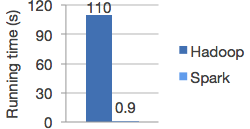
Spark is 100X times faster then Hadoop.
The speed can be attributed to the fact that Spark keeps the intermediate data cached in local JVM.  Hadoop on the other hand in the name of Fault Tolerance write the intermediate data on to the disk and disk is expensive.
                                                                                                               *Image from Spark


Spark doesnt replace anything in Hadoop Ecosystem rather it offers a readable, testable way to write programs freeing us from the painful Map Reduce jobs. MR model is unsuitable for Iterative algorithms. MR jobs are pain to program too. Although there are tools to reduce our efforts in writing MR jobs like Hive, Cascading etc but internally they call MR jobs thus not improving the performance.

Spark programming model
The main abstraction for computation in Spark is Resilient(Can start automatically) Distributed Datasets.

What is RDD ? 
RDD(Spark Paper) :
RDD's are fault-tolerant, parallel data structures that let users explicitly persist intermediate results in memory, control their partitioning to optimize data placement, and manipulate them using a rich set of operators.


Spark transformations applies same data operation to many data items. This results in better Fault tolerance as only the lineage of transformation is logged rather then the actual data. Also if some of RDD's are lost it has enough information to how it is derived from other  RDD's.
RDD can be created through Transformations(map,filter,join). Spark creates Direct Acyclic Graph of these transformation . Once the RDD's are defined through transformations , actions can be applied on them.
Actions are application that returns a value(count,collect and save). In Spark RDD's can be stored in disk by calling persist.
Since it is just an RDD it can be queried via SQL Interface, ML algos etc.

In short
User Program => 
Create Spark Context
sc = new SparkContest
Create Distributed Datasets called RDD's 
Perform Operations.

Inside spark context act as client and master per application.

Block tracker => What is in memory what is on Disk ?
Shuffle => Shuffle operation like Groupby

Scheduler talk through cluster manager talks to a worker.
Contains Block Manager for Block Mgmt.
Recieves task that run in thread pools.
Task can talk to HDFS.