Wednesday, 7 September 2016

Setting up spark on a multicluster Machine

  1. Spark work on a master - slave model. 
  2. Master Machine and Slave Machines required. You can have master and slave on same machine too. 
  3. For testing purpose you can generate the cluster on same machine , approach similar 
  4. In each machine check if Java is installed

    JAVA install/update 
  5. If you are using a new machine, ec2 it wont come preinstalled with Java.  
  6. You can set up Java following below steps
  7.  First update package index :
    1. sudo apt-get update
    2. check version java -version 
    3. If Java not found →  Install JRE 
      1. sudo apt-get install default-jre
      2. sudo apt-get install default-jdk
  8. check Java-version 
  9. This might install Java 1.6 
  10. sudo apt-get install openjdk-7-jre
  11. sudo apt-get isntall openjdk-7-jdk
  12. Issue : Java still points to version 6. 
  13. Follow below steps to update 
    1. update java-alternatives -l
    2. sudo update-java-alternatives s java1.7.0-openjdk-amd64 (your path to the newer) 

    Instance Setup 
  14. Login to Dev or EC2 instances 
  15. If Running on Ec2 Do the following:
    1. Create an account, generate private  and public key pairs download the keys to one of the machine. You can get those steps online on how to generate key pairs. 
    2. Create two system variables for AWS_ACCESS_KEY and AWS_SECRET_KEY
    3. Go to spark directory on your local machine  and run the ec2 script from ./sbin/ec2 file.
    4. ./spark-ec2 --key-pair=awskey --identity-file=awskey.pem --region=us-west-1 --zone=us-west-1a launch my-spark-cluster
    5. This will create two Large instances cluster. 

    SetUp Spark 
  16. Download Spark → Select Hadoop latest  Version and follow the link  
  17. For dev box : you can download using : 
    1. wget spark link 
    2. unzip using tar -xzf folder for spark
  18. Do this in all machines you want to run spark on .
  19. Set up env variable SPARK_HOME to point folder just before the bin directory, in normal case it will be the unzipped folder
  20. Save it using source ./bashrc
  21. Decide on which machine you want your master and slave


    Master Machine 
  22. Login to Master Machine, follow below steps
  23. edit hosts file for master
    1. vi /etc/hosts
    2. Provide the link between IP and name 
    3. IP Machine1
      IP Machine 2 
       
  24. Next few steps are changes in spark code
    1. slaves template is located in the conf directory.
    2. there is a file called slave template, same file can be used or a new file called you can create from that buy copying the content to slaves
    3. Paste the names of all slaves in this file 
      1. slave 1
      2. slave 2
      3. slave 3
  25. Go to Spark Sbin Directory 
    1. cd ./sbin/
    2. run ./sbin/start-master.sh
  26. This will start the master on port 8080, access it via IP address or Machine Name
  27. For current case go to any web browser and type :  http://machinename:8080
  28. This was required because you need to get the spark master address. When you go to the link it will show the url at the top spark://machinename:7077 
  29. Copy it 
  30. Go to /conf/spark-defaults.conf.template
  31. Add the masters url in the file 
  32. spark.master spark://machinename:7077 (it can also start with IP or a bigger name like machinename:7077
  33. Go to /sbin/spark-env.sh
  34. Add the following lines to it 
  35. export SPARK_WORKER_MEMORY=1g  You can specify how much memory you wanna give to worker 
    export SPARK_WORKER_INSTANCES=2 → No of workers
    export SPARK_MASTER_IP=spark-2 → Name of Spark master
    Slave
  36.  Go to slave Machine /sbin/start-slave.sh
  37. Run JPS in both slaves and master

Note : You need a password less access between master and  copy masters pub key defined in : id_rsa.pub move to authorized_key in slave and save. 

Very Useful links
http://blog.cloudera.com/blog/2015/03/how-to-tune-your-apache-spark-jobs-part-1/
http://blog.cloudera.com/blog/2015/05/working-with-apache-spark-or-how-i-learned-to-stop-worrying-and-love-the-shuffle/
https://www.codementor.io/spark/tutorial/spark-python-rdd-basics

Tuesday, 24 November 2015

Data Analytics with Amazon Machine Learning - Premier League Data

Dataset Source : Soccer 
Use Case and Dataset
The most important part of any machine learning application is to get the right dataset. As I am very much interested in Soccer, I thought of using the previous Premier league to predict winner of this season.
I agree that winner prediction is arguable and its hard to predict the winners due to so many factors associated, but I just want to try my hands on the new machine learning framework released by amazon few days back called “AWS Machine Learning ”.  
Steps :
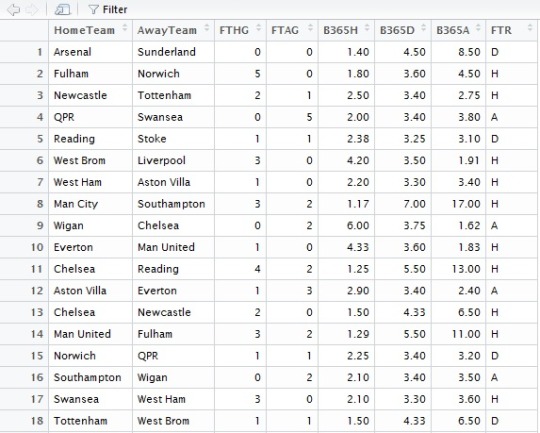
1. Download last 5 years of Premier League data from the website (2010-2015).
2. Data From (2010-2014)  will be the training data.
3. 2015 will be the test data.
4. Extract following information from dataset

HomeTeam = Home Team
AwayTeam = Away Team
FTHG = Full Time Home Team Goals
FTAG = Full Time Away Team Goals
FTR = Full Time Result (H=Home Win, D=Draw, A=Away Win)
B365H = Bet365 home win odds
B365D = Bet365 draw odds
B365A = Bet365 away win odds
The reason I want to include Bet365 is because I think bets tell a lot about the current performance of the team which the match result doesn't tell. 
5. Combine all 4 files of dataset into one.
file1 <- read.csv("~/My Received Files/2010.csv", header = TRUE, stringsAsFactors = FALSE)
file2 <- read.csv("~/My Received Files/2011.csv", header = TRUE, stringsAsFactors = FALSE)
file3 <- read.csv("~/My Received Files/2012.csv", header = TRUE, stringsAsFactors = FALSE)
file4 <- read.csv("~/My Received Files/2013.csv", header = TRUE, stringsAsFactors = FALSE)
file5 <- read.csv("~/My Received Files/2014.csv", header = TRUE, stringsAsFactors = FALSE)

f1f2 <- rbind(file1, file2)
f4f5 <- rbind(file4, file5)
f1clean <- f1f2[,c(3,4,5,6,24,25,26,7)]
f2clean <- f4f5[,c(3,4,5,6,24,25,26,7)]
f3clean <- file3[,c(3,4,5,6,23,24,25,7)]
f2combine <- rbind(f1clean, f2clean)
finalfile <- rbind(f3clean, f2combine)

image
Rbind function : Combines  matrix, vactor or dataframe by values.

6. Save the dataframe to CSV file
write.csv(finalfile ,"~/My Received Files/test.csv")
7. Sort in alphabetical order.
teams = sort(unique(c(as.character(finalfile$HomeTeam), as.character(finalfile$AwayTeam))))
8. Create a table to store the wins and point record of each team. For that we create an empty data frame called final table with below columns.
finaltable = data.frame(Team = teams,
                     Games = 0, Win = 0, Draw = 0, Loss = 0, PercentWins=0,
                     HomeGames = 0, HomeWin = 0, HomeDraw = 0, HomeLoss = 0, percentHomeWins =0,
                     AwayGames = 0, AwayWin = 0, AwayDraw = 0, AwayLoss = 0, percentAwayWins =0)
9. Store in the above table count of matches all teams we can use the function as.numeric for that
finaltable$HomeGames = as.numeric(table(finalfile$HomeTeam))
finaltable$AwayGames = as.numeric(table(finalfile$AwayTeam))
10. Fill other columns based on values.
The values can be filled using FTR.  Extract the hometeam column of the dataset and see if the FTR column is H, D or A.  Group all these together first based on FTR H then based on team.  Similarly for D and A. and also for win and loss.

finaltable$HomeWin =
 as.numeric(table(finalfile$HomeTeam[finalfile$FTR == "H"]))

finaltable$HomeDraw =
 as.numeric(table(finalfile$HomeTeam[finalfile$FTR == "D"]))

finaltable$HomeLoss =
 as.numeric(table(finalfile$HomeTeam[finalfile$FTR == "A"]))

finaltable$AwayWin =
 as.numeric(table(finalfile$AwayTeam[finalfile$FTR == "A"]))
finaltable$AwayDraw =
 as.numeric(table(finalfile$AwayTeam[f7$FTR == "D"]))
finaltable$AwayLoss =
 as.numeric(table(finalfile$AwayTeam[f7$FTR == "H"]))
11. Calculate total wins, games,draw  and loss. by adding the total for Home and Away games.
finaltable$Games = finaltable$HomeGames + finaltable$AwayGames
finaltable$Win = finaltable$HomeWin + finaltable$AwayWin
finaltable$Draw = finaltable$HomeDraw + finaltable$AwayDraw
finaltable$Loss = finaltable$HomeLoss + finaltable$AwayLoss
12. Calculate percent wins for total, home and away wins.
finaltable$PercentWins = floor((finaltable$Win / finaltable$Games)*100)
finaltable$percentHomeWins = (finaltable$HomeWin / finaltable$HomeGames)*100
finaltable$percentAwayWins = (finaltable$AwayWin / finaltable$AwayGames)*100
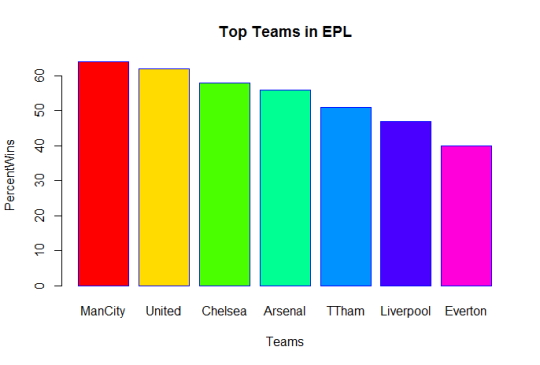
13. Simply graph to extract top 10 teams
finaltable = finaltable[order(-finaltable$PercentWins),]
graphtable = finaltable[1:7,]
graphdata = finaltable[,c(1,5,10,15)]

barplot(graphtable$PercentWins, main="Top Teams in EPL by percent wins", xlab="Teams",
       ylab="PercentWins", names.arg=c("ManCity","United","Chelsea","Arsenal","TTham","Liverpool","Everton"),
       border="blue",col=rainbow(7),fill = rainbow(7))

image
ManCity holds the record of maximum wins in last 5 years, followed closely by Man united and chelsea.

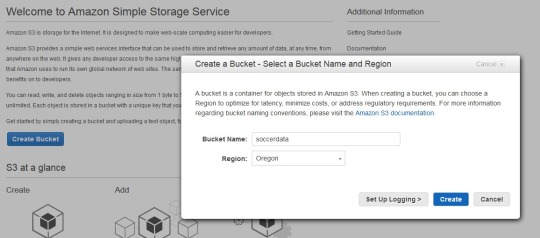
14. Add data to S3.Since AWS ML uses S3 as data storage, you need to upload your data to S3. Create a bucket in S3 and upload the dataset created above to it. This is our test data and all predictions will be based on it. Our dataset is in CSV format as required by AWSML

image
15. Open AWS  Console : https://console.aws.amazon.com/machinelearning/
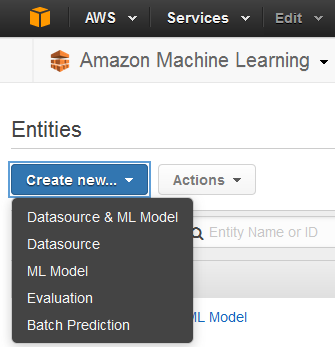
Next step is to create a ML model and link the S3 dataset.
Create new datasource. You can specify data location to be either S3 or redshift.


image

Sunday, 19 July 2015

Data Analytics with R - World Bank Refugee Population data

Data Source :  World Bank Data
Problem :  To observe the distribution of refugees across the globe in past two decades.

Data Cleaning : Removed all countries with <100 people as refugees. Remove all unnecessary columns with no relevent data like Indicator name, Indicator code.

Step 1: 
1. Install R
2. IDE : RSTudio,
3. Online Editor : Data Joy.

4. Loading dataset in R:
df <- read.csv("data.csv", stringsAsFactors=FALSE)
this create an object by name mydf. Each cell in a CSV file is in a delimiter seperated format, mostly the delimiter is comma but there can be others as well.  The first row contains the header in this case “Country Name “, “Country Code” and the refugee population between years 1990-2013. We can prevent conversion of string to factor( A type) in R by setting stringAsFactors to false. By default it is true.


image
5. To check all the column names :
In the console type : 

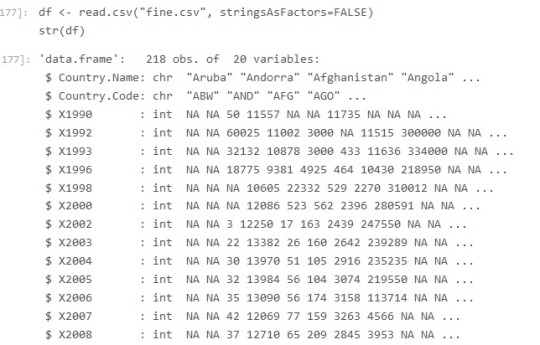
  • str(df)This function compactly displays the Structure of an R Object.  All the column headers with data type wil be displayed.


image
2 char columns are Country Name and Code. The rest are number of people that seek refugee in the specific country.

6. To access columns of a dataframe,
You can use :

table(mydf$Country.Name)
To get header names use :
print(names(df))
Table command will return you a vector with value in column Country.Name and the count of that value, since these values are population of refugees, which is unique it gives you count 1.
Afghanistan                  Albania                  Algeria                                               1                                        1                          1
To get the proportion one can use :
prop.table(table(mydf$Country.Name))
Though not required for this data.
7.  Create a new column Category in the data frame
df$Category  <- mydf$Country.Code
8. To get the upper limit of our data, we need to get the maximum number of refugees by a country in particular column. For Year 2013 the maximum value can be extracted using:
max(df$X2013, na.rm = TRUE)
9. There are some countries in dataset where the columns are either not available or empty, resulting in a lot of “NA” in the data. Lets convert all Empty columns to a numerical value of 1(~0).
df[is.na(df)] <- 1
In ‘R’ the value is assigned using ‘<-‘ operator, this makes all ‘NA’ columns as 1.

10.  Since the dataset has  highly varying range of values, ranging from 1 to 2712888, I decide to categories them into different categories. The idea is to create a bucket distirbution. Each bucket will have some capacity, in this case say 10000.  


Bucket 1 : 1- 9999 (All entries between 1-9999 will be in this bucket.
Bucket 2:  10000-19999
and so on.

11. Now we have to loop through every cell value in the data frame and replace it with the bucket they fall into.

for(i in names(df)){if((i != colnames(df)[1]) && (i != colnames(df)[2]) && (i != colnames(df)[18])){
      sq<-seq(0,3000000,10000)
      qr<- cut(df[,i],sq,labels = c(1:300))
      df[,i]<-as.numeric(qr)
   }
}
Excluding all values in the first (Country Name column), second (Country Code column), last column which we created previously called Category.
R provides a method called cut: cut converts the range of values into intervals and assigns the values in x according to which interval they fall.
cut((x, breaks, labels = NULL, ...))
X : a numeric vector which is to be converted to a factor by cutting.

breaks : breaks either a numeric vector of two or more unique cut points
labels”  labels for the levels of the resulting category.
A intermediate factor vector is created for each column and the resulting value of the column is updated with it.  SInce this is a factor vector, the value is typecast to numeric in the next line. If the number of cut points doesn't match based on the cut, an error will be thrown “Length do not match”
No of cutpoint = Data Max Value / Capacity of bucket
12. Convert your data to long format as needed by ggplot
GGPlot is a graph plotting library of R.
Reshape2 is a transformation library.

Library(reshape2)
df.molten <- melt(df, value.name="Count", variable.name="Year", na.rm=TRUE)
13. Plot the graph using ggplot’s qplot by categories.
par( mfrow = c(3,3) )

library(ggplot2)

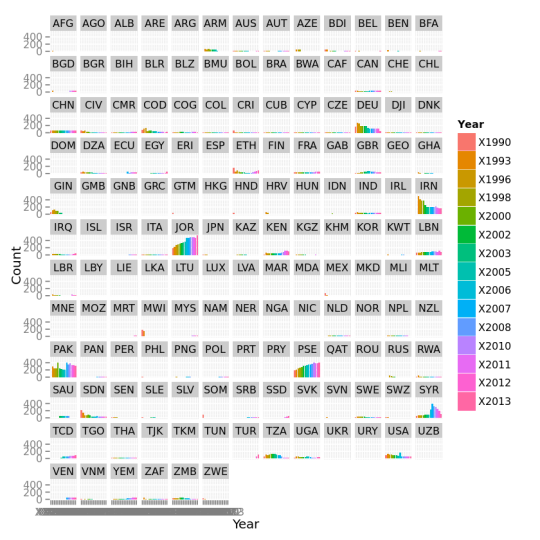
qplot( data=df.molten, x = Year,y = Count, geom="bar", size = I(2),stat = "identity" ,las=0.3, cex.names=0.4) + facet_wrap( "Category" ) + geom_bar(width=1.5)


image

14. Some useful information retrieved from data :
a ) Number of refugees increasing every year.
b) Huge rise in number of refugees in European countries in last few years
c) Jordon, Pakistan, Iran and Germany has most number of refugees.
d) Sweden refugees are increasing at an alarming pace, but lesser then last few years.
e) Most of the countries are very much constant with the number of refugees they allow in their home country esp Chech Republic, Greece, India, and China,
f) In European countries Germany (Country Code - DEU) has the highest number of refugees.
g) There is a large uneven distribution of refugees across europe, some countries <1000 refugees and some numbers are too high.
h) United States also has a large number of refugee population and it is just second to Germany(excluding middle eastern states) in terms of numbers.
i) There has been sudden rise in number of refugees especially in Gaza, Syria, Canada, Britain.
f) Iran, Zimbabwe, Saudi Arabia Ghana has seen big decline in past few years .
g) The number if refugees in Saudi Arabia, UAE, Russia and Qatar are alarmingly low.
h) Number of refugees in Europe is rising. Germany, France, United Kingdom and Sweden and Turkey leads in number of refugees.

Wednesday, 24 June 2015

Playing with Tumblr API

1. Install Ouath2
2. Install Pytumblr
3. Register an Application
https://www.tumblr.com/oauth/apps
4. Get tumblr ouath2, you will get once you create app

5. Enter your credentials in following code in Python file
client = pytumblr.TumblrRestClient(
    '<consumer_key>',
    '<consumer_secret>',
    '<oauth_token>',
    '<oauth_secret>',
)
pytumblr is a library,  through which you can make calls to tumblr.

6. Code to get all blogs you are following
off =0
while True:
    my_dict = client.following(offset =off)
    res = my_dict['blogs']
    for rs in res:
        print(rs['name'] + "...." + rs['title'])
   
       
    off+=20
7. Number of posts liked for each blog
off =0
like_dict= {}
while True:
    my_dict = client.blog_likes('conflatedthought.tumblr.com',offset =off)
    res = my_dict['liked_posts']
    for rs in res:
        strs = str(rs['tags']).strip('[]')
        #print(rs['blog_name'] +" "+ strs)
        #print("..")
        if rs['blog_name'] in like_dict.keys():
            like_dict[rs['blog_name']] += 1
            #print rs['blog_name'] +"  " + str(like_dict[rs['blog_name']])
        else:
            like_dict[rs['blog_name']] = 1   
          
    off+=20
for the_key, the_value in like_dict.iteritems():
    print the_key, 'corresponds to', the_value 
8. Sample Output for code 6
sportspage....Sports Page
themobilemovement....The Mobile Movement
adidasfootball....adidas Football
instagram-engineering....Instagram Engineering
soccerdotcom....SOCCER.COM
sony....Sony on Tumblr
yahoolabs....Yahoo Labs
taylorswift....Taylor Swift
beyonce....Beyoncé | I Am
itscalledfutbol....Did someone say "futbol"?
futbolarte....Futbol Arte
fcyahoo....FC Yahoo
yahooscreen....Yahoo Screen
yahoo....Yahoo
engineering....Tumblr Engineering
yahoodevelopers....Yahoo Developer Network
mongodb....The MongoDB Community Blog
yahooeng....Yahoo Engineering
marissamayr....Marissa's Tumblr
staff....Tumblr Staff

whoagurt....Whoagurt
narendra-modi....Narendra Modi
nytvideo....New York Times Video
bonjovi-is-my-life....Bon Jovi♥ Is My Life
etsy....Etsy
game-of-thrones....You win or you die.
seinfeld....Seinfeld
itunes....iTunes
teamindiacricket....Team India
gameofthrones....Game of Thrones: Cast A Large Shadow
forzaibra....Forza Ibra

Friday, 24 April 2015

Tumblr Blog

My Tumblr Blog


Why I am moving to tumblr :
1. Lots of stuff to read
2. Simple to use.
3. 230 Million Blogs
4. No Charge.
5. Great Design optimized for Mobile.
6. Easier to get followers


7. I am joining Yahoo :)

My blog will remain active but most of the new post will be on tumblr.

Thursday, 12 March 2015

Spark Streaming

In my previous post I mentioned about Spark Stack. In this post I am to give a brief overview of the component Spark Streaming.
Spark Streaming is an extension to Apache Spark that allows processing of live streams of data.
Data in Spark can be ingested from Kafka, Flume, Twitter or TCP sockets. 

Live Data is broken into chunks/batches for predefined interval of time. Each chunk of data represents an RDD and is processed using RDD operations. Once the operations are performed the results are returned in chunks.
DStream is a basic abstraction in Spark Streaming. They represent a chunk of data and as such implemented as an RDD. Dstreams are created from streaming input sources like Kafka, Twitter etc or by applying transformation operations on existing DStream.
Spark Streaming

The incoming data as mentioned above is processed in predifined interval. All the data for any interval is stored across the cluster for that interval. This results in creation of a dataset. Once the time interval is completed dataset is processed using various operations. The operations could be map-reduce or join. 
Streaming Context is the main entry point of spark application.
val sc = new StreamingContext(sparkContext, seconds(1))
Using sc, Dstreams can be created that represents streaming data from input sources ex. TCP/Twitter. 
TCP
val sData = ssc.socketTextStream("1.2.3.4", 1000)
Here First parameter represents Ip address and second port number. sData represents Dstream of data that will be received from server.
Twitter
val tData = TwitterUtil.createStream(ssc, oauth)
Where oauth denotes the Oauth. Twitter uses Ouath for authorization requests.

Once this is done transformations are applied on the created RDD. One such transormation is flatMap. 
val hashTag = tData.flatMap(status => getTag(status))
val words = sData.flatMap(_.split(" "))
flatMap is an operation that is similar to map but each input is mapped to 0 or more output items resulting in a sequence of data as output. 


Thursday, 25 December 2014

Apache Spark a brief overview

Apache Spark a PHD resarch project at UCBerkley came into limelight when it broke the record of sorting petabyte of data recently.
Various Sorting Records.
Databrick


What is Spark ?
Apache Spark™ is a fast cluster computing framework and general engine for large-scale data processing.
Spark Goals:
Generality : Diverse workloads, operators, jobsizes.
Latency:Low Latency
Fault Tolerance


Spark supports Hadoop, Amazon S3, Cassandra, cluster management tools like YARN and Mesos. Spark does more In memory data processing as compared to DiskBased processing as in Hadoop.

Spark stack comes bundled with tools like Spark SQL, MLlib, Spark Streaming and GraphX.


  1. SparkSQL: Unified access to structured data , provides compatibility with Apace Hive and Standard Connectivity to tools like JDBC and ODBC.
  2. Spark Streaming:  For Scalable fault tolerant Streaming applications and spark can run in both batch and interactive mode.
  3. MLlib:Scalable Machine Learning library.
  4. GraphX:Large Scale Graph Processing Framework.
Learn More about Spark


Spark vs Hadoop

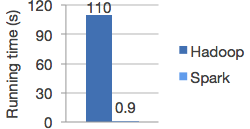
Spark is 100X times faster then Hadoop.
The speed can be attributed to the fact that Spark keeps the intermediate data cached in local JVM.  Hadoop on the other hand in the name of Fault Tolerance write the intermediate data on to the disk and disk is expensive.
                                                                                                               *Image from Spark


Spark doesnt replace anything in Hadoop Ecosystem rather it offers a readable, testable way to write programs freeing us from the painful Map Reduce jobs. MR model is unsuitable for Iterative algorithms. MR jobs are pain to program too. Although there are tools to reduce our efforts in writing MR jobs like Hive, Cascading etc but internally they call MR jobs thus not improving the performance.

Spark programming model
The main abstraction for computation in Spark is Resilient(Can start automatically) Distributed Datasets.

What is RDD ? 
RDD(Spark Paper) :
RDD's are fault-tolerant, parallel data structures that let users explicitly persist intermediate results in memory, control their partitioning to optimize data placement, and manipulate them using a rich set of operators.


Spark transformations applies same data operation to many data items. This results in better Fault tolerance as only the lineage of transformation is logged rather then the actual data. Also if some of RDD's are lost it has enough information to how it is derived from other  RDD's.
RDD can be created through Transformations(map,filter,join). Spark creates Direct Acyclic Graph of these transformation . Once the RDD's are defined through transformations , actions can be applied on them.
Actions are application that returns a value(count,collect and save). In Spark RDD's can be stored in disk by calling persist.
Since it is just an RDD it can be queried via SQL Interface, ML algos etc.

In short
User Program => 
Create Spark Context
sc = new SparkContest
Create Distributed Datasets called RDD's 
Perform Operations.

Inside spark context act as client and master per application.

Block tracker => What is in memory what is on Disk ?
Shuffle => Shuffle operation like Groupby

Scheduler talk through cluster manager talks to a worker.
Contains Block Manager for Block Mgmt.
Recieves task that run in thread pools.
Task can talk to HDFS.

Saturday, 4 October 2014

Data Analysis Yahoo Finance Data

What the Script does :
=> Downloads historical Stock Prices for a company from Yahoo Finance website.
=> Calculates the 10 day moving average.
=> Generate the graph for the data


a) Necessary Imports:
1. Import Panda. Panda is a data analysis library of python.  Pandas has tool to read and write between in-memory data structures and different file formats. It has efficient data frame object for data manipulation with better indexing support.
2. Import Datetime: Provides classes to manipulate date and time objects. Api to convert between different file formats.
3. Import matplotlib: Python 2D plotting library , simple to use and genrates graphs, plots etc with few lines of code. 
4. Import Numpy : Scientific computing package for python,N-Dimensional array object ,Linear algebra related functions.
5. Import urlib: URL handling module for python
import pandas as pd
import pandas.io.data
from datetime import timedelta
import datetime as dt
from pandas import Series, DataFrame
import matplotlib.pyplot as plt
import matplotlib as mpl
import urllib.request
import numpy as numpy
from datetime import datetime
from matplotlib.pyplot import *
import matplotlib.dates as mdates

b) Create a class called Stock 
The main(Init) function should accept as parameter the company symbol, lookback period, window size,and the end date.
def __init__(self,symbol,lookback_period,window_size,end=datetime.date.today()): 
Suppose your lookback period is 100 then get prices for 100 days.
SO to get prices for 100 days subtract from the end date the lookback period.
But for that you need to use same format . 
In this example I have used timedelta.  Time delta helps you get the start date by specifying the number of days  from given date. Like your end date is today and you want stoc prices for last 100 days ,we can use timedelta.

start = end - timedelta(days=lookback_period)
c) Convert date into required format.
start_date = start.isoformat() 
d)  get the required Url for data analysis. 
url = "http://ichart.finance.yahoo.com/table.csv?s={0}".format(symbol)
url += "&a={0}&b={1}&c={2}".format(start_month,start_day,start_year)
url += "&d={0}&e={1}&f={2}".format(end_month,end_day,end_year)
e) Parse data
df = pd.read_csv(urllib.request.urlopen(url))
#get the adj close from csv
saved_column = df['Adj Close']
#get the matching date
y_data = df['Date']
f) Get the moving average
def movingaverage(self,interval, window_size):
window = numpy.ones(int(window_size))/float(window_size)
return numpy.convolve(interval, window, 'same')

Moving Average smooths price fluctuations by removing the noise. It computes the averages of a subset of full data set.

Moving Average Wiki 

g) Generate the graph
 x_data = x_points[0:70]
#get the moving average
y_av = self.movingaverage(saved_column,window_size)
#generate graph
figure("Plot of stocks")
x = [dt.datetime.strptime(d,"%Y-%m-%d").date() for d in x_data]
gca().xaxis.set_major_formatter(mdates.DateFormatter("%Y-%m-%d"))
gca().xaxis.set_major_locator(mdates.DayLocator())
plot(x,y_av,'r')
plot(x,close,'g')
gcf().autofmt_xdate()
xlabel("Date")
ylabel("adjusted close")
show()

GIT

Tuesday, 23 September 2014

Hadoop a little deeper


Map Reduce :  Follows Master -  Slave Model 
Master :
NameNode
JobTracker 

Slave :
DataNode
Task Tracker


Dynamo/ Casandra => Peer to Peer

Client is neither master nor Slave.
=> submit map reduce task
=> describe how data to be processed.
=> retrieve data.

Hadoop Components  :

 
NameNode : 
=> Files are not stored in NameNode , it just contains filesystem meta data which points files to blocks 
=> Metadata also contains information such as DiskSpace, last access to NN, permissions . 
=> Name Node is rack aware. To what Rack data node is on.  
=> NameNode coordinates access to data node.


Data Node:
=> Manages Data 
=> Sends Heartbeat message to NN to say they are alive.
=> Comunicates with one another to replicate data, move and copy data around
=> Stores data as blocks.  

JobTracker: 
=> Manages job and resources in Hadoop. 
=> Client application submit MR request to Job Tracker
=> Schedule Client jobs and allocates task to Task Tracker.

 
Task Tracker: 
=> Slaves deployed at each machine. 
=> They follow instruction of Job Tracker and runs Map Reduce task
=> Handles movement of data between map and reduce phase.


Secondry NameNode:  
=> Name is a misnomer. 
=> It does all housekeeping task in HDFS. 
=> Namenode store all filesystem metadata in RAM. It doesnt have any capability to persist data to disk. 2ndNN sends message to NN every hour pull all the data from NameNode and merges into a file called Checkpoint.


 *Image taken from http://www.gigacom.com


Hadoop 1.**   => Hadoop 2.**:

1. Horizontal Scaling
2. Single Point of Failure for Name Node
3. Impossible to run Non Map Reduce tools because of tight coupling of JobTracker + MR
4. Does not support Multitanency
5. Job Tracker overburdened bcz of too much work.


1. Horizontal Scaling

NameNode all metadata stored in RAM of NameNode
RAM size is limited you cannot take it beyond certain point. 
Bottleneck after 4000 Nodes.

2. Single Point of Failure
No backup node if Namenode fails

3. Impossible to run Non Map Reduce tools because of tight coupling of JobTracker + MR
Only Map Reduce processing can be achieved
Realtime analytics , MPI difficult, No Graph processing
You cannot do in HDFS you have to move data out of HDFS. 
Only Batch processing in 1.** 


4. Multitanency :
Only 1 type of job at a time even if you run it from different application not possible.


Hadoop Component 2.** extra
1. Resource Manager
2. Namenode High Availability
3. YARN: Yet another resource Negotiator.


Instead of having single Name node multiple name nodes are there. Independent to each other. Adhere to specific namespace.

Both JobTracker and task Tracker removed in Hadoop 2 .
Job Tracker task : Resource Management & Job Scheduling was split into two components.below 

New Components in Hadoop2.


1. Resource Manager :  
=> Scheduler that allocates resources in the cluster to various running application. 
=> Schedules task based on Application Container. 

2. Application Manager
=> Launches task in containers. 
=> Starting Application Master container on failure.

3. Node Manager:  
=> Runs on each node
=> Follows orders of Resource Manager. 
=> Responsible for maintaining container 
=> manages resources of a single node.


Other Feautures:

Name Node HA:
Automatic failover and recovery for NameNode master survice.
2 Namenodes :   Active and Passive when one fails other take control.

Snapshots:
Point intime recovery for backup.

Federation :
Generic block storage layer.

Wednesday, 10 September 2014

A * Star Algorithm

A* is a path finding/Graph Traversal  algorithm generally used in game programming to determine the shortest path to reach a particular destination following Best First Search approach. Can be called as an extension of Dijkstra and reduces the number of comparisons while guaranteeing optimality. Heuristic is used in A*. A* uses heuristic to determine most promising node.   


Consider a grid with each square numbered. As in the above figure , cross sign (Sq. 14) represents start point and cross sign (Sq 35) represents destination. All Blue bars in a square represents the block. 
Each square considered a node.
Some terminology used with A*
Node Data
H Value :  Heuristic Value
G Value : Movement Cost                
F Value : G + H Value
Parent :  Pointer Back to previous node.

List
Open Node : List of Nodes to be visited
Close Node :  Already Visited.

Task : Shortest Path from 14 to 35.
H Value : Distance of a Node from destination node in our case from Sq 35.
Precompute all H value

If H value is Zero A* behaves like Dijksatra Algorithm. From Node 17 H value is 3 as you can go from 17 to 23 to 29 leading to 35
For Node 25 H value is 5 as you go from node 25 to 26 to 27 to 28 to 29 leading to 35 , block nodes are also considered for precomputing H values.

G Value is movement cost from Start node to another node.
Consider Movement cost of 10 For Horizontal and Vertical and of 14 for diagonal movement.
Diagonal > Horizontal (Pythagorean theoram)
So to Move from 14 to 8 the cost is 10 and from 14 to 9 it is 14.
Each square has parents.
For Sq. 14 we need to get parent , which can be done through open list and close list.
Write now no node on Close or open list.

All Node parent to14.
CloseList : 14
Open List : 7,8,9,13,15,19,20,21
Calculate G Cost for all. for 8 it is for Node 14 it is 0 for Node 8 it is 10 so total is 5. For Node 9 it is 14.


The Numbers in Black represents the H value of Nodes ie Distance of Node to Node 35.
The numbers in Blue represent G Value Node 8 as G Value 10.
F Value is sum of G Value + H Value which is written in red for the nodes. (For node 7 it is 17 => 10+7)
Need to Use Node with smallest F Value.
So in our case square number 15 as it has F-Value 15 which is minimum. Node 20 too has value 15 and can be selected too.
Take Node 15 put in close list.
Now repeat process for Node 15.

Now Calculate all values for Node 15.
CloseList : 14 , 15
Open List : 7,8,9,13,19,20,21,10
We see Node 14 already on Close list dont do anything.
Consider Node 8 so we check if it is more faster to go to 8 from 14 or  from 15.
For Node 15 We see :
G Value for Node 15 was 10 . G Value for Node 8 considering the current node 14 is 14
So total Movement is 14+10 ie 24
If the total movement > current G value dont change values else
If G value wrt node 15 is less then G Value of Node 8 then re parent node  8 to node 15.

If(Parents G value+Current G < Parents New G){
Add new Block to close list.
New Block parent = Prev Block Parent.
}


This process continues till you are next to destination node.

Closed : 14,15,20
Open : 7,8,9,13,19,21,10,22,25,27
Keep Doing and then see neighbor is destination so make destination parented to the other node and you are done.
Trace back path from destination to source.
35 to 29 to 22 to 15 to 14.
Make sure you change the parent if you find new G value smaller then previous computed.


All Green Arrow denotes final position of main node parents. Red is the path from source to destination.

Shortest Path : 14 ->15->22->29->35


Useful links for the topic 

Wiki
Stanford Amits Page
Video  
Video
Video
Algo
 

Friday, 11 July 2014

Hadoop-HDFS Code Analysis-1

I had hard time understanding the HDFS code, not only because it was too big and complex but also because of lack of documentation available.

1. Create File System
FileSystem is an abstract class extending Hadoops configured class.
Like a Normal file system it defines all File functions.
All File System that Hadoop use indirectly extends FileSystem class.
Which File System to be invoked depends on  Hadoop Configuration file.
 Suppose we specify hdfs://localhost:9000 which tells hadoop uses DistributedFileSystem.
This file can be invoked from core-default.xml
file:/// invokes LocalFileSystem

2.Client invokes Server
mkdirs function assume calls the DistributedFileSystems mkdir

public boolean mkdirs(Path f, FsPermission permission) throws IOException {
    return mkdirsInternal(f, permission, true);
  }

mkdir() calls mkdirInternal which inturn uses variable : dfs which is object of DFSClient
Apache File Descritption

DFSClient can connect to a Hadoop Filesystem and perform basic file tasks. It uses the ClientProtocol to communicate with a NameNode daemon, and connects directly to DataNodes to read / write block data. Hadoop DFS users should obtain an instance of DistributedFileSystem, which uses DFSClient to handle filesystem tasks.

Initialize Method is called.

All operation on DistributedFileSystem transferred to DFSClient.

public DFSClient(URI nameNodeUri, ClientProtocol rpcNamenode,
      Configuration conf, FileSystem.Statistics stats)
    throws IOException {

DFSclient method call forwarded to namenode and its assoicate variable rpcNameNode
Client Protocol provide all method through which methods from client to server can be invoked.
All method calls from rpcNamenode come down to Invokers invoke() method.
This way the calls are transferred to server side method calls.
Eventually it gets connected to Server class.
3 major components of server
Listener, Responder, Handler,


...

Wednesday, 4 June 2014

Consensus Protocols : Overview

Consensus Problem :  Mutually Agreeing on a particular Value


In this I have Considered both Txn and Normal operations consensus . 


Synchronous System :
Bounded Message Delay
No timeouts

Asynchronous : 
Message delay finite but unbounded
Consensus not always possible

Correctness of Consensus Protocol :
Agreement : All Nodes agree on a value
Validity : Value proposed is Valid ie.. It is proposed by one of participant node.

Non Triviality* : There exist a accessible configuration in which the decision is to commit
Integrity*: Each (RM decides atmost once)

Termination: All nodes Eventually Terminates
*For Txn commit

Agreement can be between majority of nodes.
Database Commit protocol that always says Abbort is not Valid
Termination of messages exchanged so that the protocol is useful.

2PC : 2 Phase Commit: 

1)Coordinator : Contact all nodes, suggest value , gather response(Form of Vote)
2)If everyone agrees contact for committing else contact for abort.


IMP: Consensus here is not on value proposed but weather to accept or reject the value nor the value.
Not on what value should but rather weather to accept or reject value.

Real Time Example
Transfer money from one account to another
Move file between servers

TO check weather commit happened see log.

Phase 1: Coordinator Request
Coordinator request (REQUEST Message to all nodes)
Eg : Delete file from directory

Nodes receive requests execute tranxn locally
Write to local log Request ,Result,VOTE_COMMIT or VOTE_ABBORT
Send VOTE_COMMIT to cordinator

Coordinator receive vote VOTE_ABORT
Write GLOBAL_ABORT/COMMIT to Global Log and sends GLOBAL_ABORT/COMMIT to participant nodes.
No of messages : 3n where n is number of nodes. ( N - Value Propose, N-Vote , N -Commit/Abbort)

Failures: 
1)Fail Stop : Nodes Crash and Never recover
2)Fail Recover: Crash and recover after sometime
3)Byzantine: Divert from protocol specification .
Example an army of Soldiers, coordinator is a general . Agree on one point or fail. Some soldiers traitor :
All loyal traitors should agree
Small Number of traitors should not be able to trick loyal soldiers.

Case 1: Before messages exchanged server crashes. (No worries) bcz protocol never started.
Case 2: Some proposal messages sent but not all.

Some nodes received proposal starting 2PC ,and some havent recieved any proposal. If coordinator do not recover in time , nodes that have sent proposal keeps on waiting for things that never finished.
Protocol Blocked.

Have another node to become co-ordinator. When timeout occurs that node can finish task that co-ordinator started.

Contacts all nodes to find out to whom the nodes voted.
So all nodes has to keep their descision on persistent storage.

If one another participating node fails before recovery node has committed, cant be recovered.
Recovery node cant distinguish between all nodes having voted to commit or abort.
Coordinator is participant too and then it fails.
 
Cordinator logs the result in persistent storage.
Advantage : Low  message Complexity.

Link: 
http://the-paper-trail.org/blog/consensus-protocols-two-phase-commit/


2PC transaction Commit: 

TM has following states : init,Preparing, Commit and aborted.
Let Trxn cordinator TMi

Phase 1: Obtaining a decision 
Initiate TM
TM ask all participant to prepare to commit transaction
TM adds record<Prepare>to its recovery long and saves it in stable storage
Send Prepare to all sites at which t is executed.

After receiving all messgae RM(Resource Manager ) can decide if it can commit on transection.
If transaction can be commited adds the record <ready> to log.
Flush all record to storage
Send Ready msg to TM
Else add <no> to log and sends a msg abort to TM

Phase 2: Aborting a decision
T commited if only TM receives ready msg else abort
TM add decision <commit> or <abort> to log 
TM sends msg to each particpant informing of descison.
RM does the same on recieving msg (Stores in log)

 
2PC suffers from Single Point of Failure.


Failure 2PC TXN RM:
RM participating in TXn fails and then recovers and then examins log:
if log says <commit> no action
log says<abort>no action
log says <ready> RM must consult TM for the fate. IF commite, redo log and write commit
else write abort.

If site contains no record => RM failed before responding to prepare. TM abort txn and RM should undo T

Failure TXN TM:
If TM fails before completion RM decides fate
IF one of RM contains commit then T is commited else aborted.
If RM of any site doesnt contain ready, no decision can be taken <abort>
IF RM has ready then sited must wait for TM to recover. Blocking problem

TOTAL MSG: 1 to initiate TM, 2n in phase 1 n in phase 2 total : 3n+1 
4 msg delay
n+1 writes to stable storage n by RM and 1 by TM


_____________________________________________________

3 PC
Problem of 2 PC removed by an extra Phase.
Idea break 2PC second phase into 2 phases. 
1st Prepare to commit phase. 
Co-ordinated sends to all if it has received yes from all .Nodes store them and then sends msg to cordinator that prepare to commit was received.
Purpose is to communicate result of vote to every node so that the state can be recovered. 

Last phase : If coordinator receives result of prepare of commit from all replica it commits, if delivery is not confirmed and our system can handle f failure co-ordinator can go ahead once it recieves f+1 msg.
If co-ordinator crash at any time , recovery node can take over transaction and query state from any remaining node.
If anyother node  crashes , it can read form other nodes.
Problem :
Network was divided into 2 partitions and both had different results.
Works for fail-stop not for fail-recover.


Cordinator fails before it has received prepared to commit replies from nodes,new co-ordinator takes over.Recover Co-or will interrogates nodes to know of the decision and completes them. At same time main co-or recovers and relies it has not received replies from all times them out,sending abort to all.messages gets interleaved with commit msg of recovery co-or resulting in inconsistent state.
_____________________________________________________________________

PAXOS 
One Node act as proposer and is responsible for initiating protocol.
Acceptors other nodes.
Acceptors accept or reject .
Once majority have  accepted protocol can terminate.
Proposer sends propose req to acceptor, acceptor responds once acceptor agrees, proposer sends commit request to acceptor.

Paxos adds 2 main improvements to 2PC.
1) Order to determine what proposal can be accepted.
2) Consider accepted if majority has done that.

Every proposer tagged with unique sequence number . Number required to decide on ordering of which proposer came first,
Once proposal arrives acceptors sees whats the highest number of proposal they have received.If new proposer number > previous acceptor reply saying it wont accept any proposal less then the recieved seq num.
All proposers unique seq number.
if two proposers are agreed on by majority atleast one will be common to both.
When new proposal is made new majority will guarantee acceptor that saw both previous proposals or two acceptors that saw one each.

Once it receives message from majority, proposer can go ahead and ask to commit to a value.

Case if 2 proposers propose first proposal accepted by just majority and if before reply of prepare to commit the acceptor fails . no majority. 
Now new proposer propose and its accepted by majority, it commits
Failed acceptor wakes up and sends final accept msg to orignal proposal first proposer commits too . Correctness voilated.  
Solution both propose same value. If any proposer receives higher value then it accepts it.


Failure :
If f failure allowed, no of acceptor 2f+1
If proposer fail, another can take over. 
If orignal recovers and see no > his own . 
It can agree on that.
Issue if both proposal send proposal one more then previous in every request, will never come to consensus.

Acceptor need to record highest proposal in stable storage.
if that storage crash cannot take part(Byzantine)

Efficiency:
1st phase : f+1 msg and recieve f+1 replies
repeat till 4 phases : 4f+4 msg
Delay till protocol completed 4 msgs.
It can be seen that 2F+1 needed for consensus with despite failure of f.
 

Paxos Commit Protocol:
Txn initiator calls TM
TM sends prepare to RM 
RM sends Phase 2a to acceptor 
acceptor sends phase 2b to TM
TM sends commit to RM
TOTAL MSG : 2F *(n+1) + 3n + 1 msgs
5 msg delays
n+2F+1 writes to stable storage.

Analysis:
1 msg initiator to TM
N prepare msg from TM to RM
N commit from TM to RM
N(2F+1) phase 2a commit msg from RM to acceptor as each RM sends to acceptor 

2F+1 phase 2b msgs.

total 2f(n+1)  + 3n+2

Transection initiated by one of RM so 1 prepare msg can be avoided bwn RM and TM
if TM in same node as acceptor phase 2b msg can be avoided. 

If each acceptor same node as RM and TM also on RM
F+1 of phase 2a and f+1 of phase 2b can be avoided.

Links:
PaperTrail
Paxos Commit 
Paxos Simple